
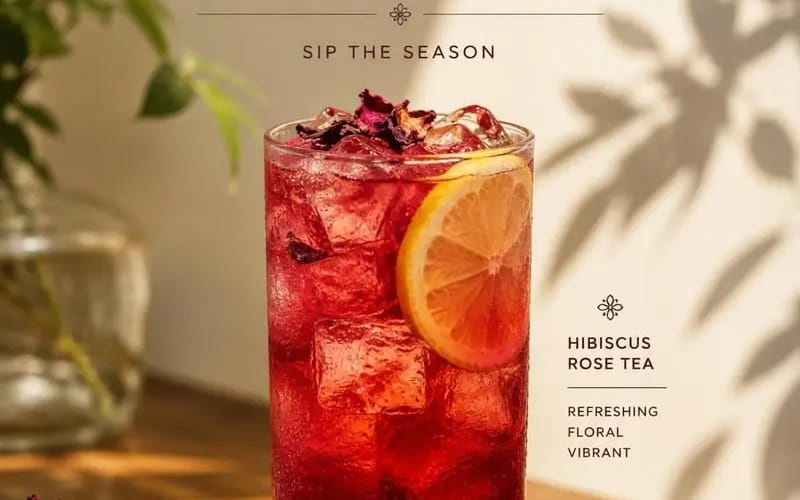
Create a premium cafe advertisement poster featuring Product
{ "PRODUCT_NAME": "", "SUBTITLE": "", "DESCRIPTION": "", "PRICE": "", "prompt": "Create a premium cafe advertisement poster featuring [Product Name] as the main subject. The composition should follow a clean, minimalist, editorial...
プロンプト
{
  "PRODUCT_NAME": "",
  "SUBTITLE": "",
  "DESCRIPTION": "",
  "PRICE": "",

  "prompt": "Create a premium cafe advertisement poster featuring [Product Name] as the main subject. The composition should follow a clean, minimalist, editorial style with warm natural sunlight, soft plant shadows, elegant typography, and a sophisticated luxury aesthetic.\n\nPlace a beautifully styled drink at the center of the composition inside a transparent glass with realistic textures, reflections, condensation, and garnish details appropriate for the beverage.\n\nThe scene should include a wooden table, subtle decorative elements, blurred greenery, and soft beige backgrounds to create a warm and inviting atmosphere.\n\nDisplay the text in the following structure:\n\nTop section:\n• 'NEW MENU' headline\n• [Subtitle]\n\nMiddle section:\n• [Product Name]\n\nBottom section:\n• [Description]\n• [Price]\n\nStyle requirements:\n• Editorial food photography\n• Soft natural lighting\n• Cinematic composition\n• Luxury cafe branding\n• Elegant serif typography\n• Realistic shadows and highlights\n• Minimalist layout\n• High-detail product photography\n\nAspect ratio: 4:5."
}このプロンプトの使い方
- 1プロンプトをそのままコピーし、好みのモデルまたは Ideart プロジェクトに貼り付けます。
- 2商品、被写体、対象者、スタイルの詳細を自分のコンテキストに置き換えます。
- 3まず基準結果を生成し、最も強い方向性をキャンペーン、画像セット、動画コンセプトへリミックスします。
このプロンプトから作成
画像 プロンプトを完成したクリエイティブプロジェクトに変換します。
プロンプトを保存し、参照画像やメモを追加して、Ideart に同じクリエイティブスレッドから次の制作ステップを形にさせます。