
Two-dimensional alternative character illustration
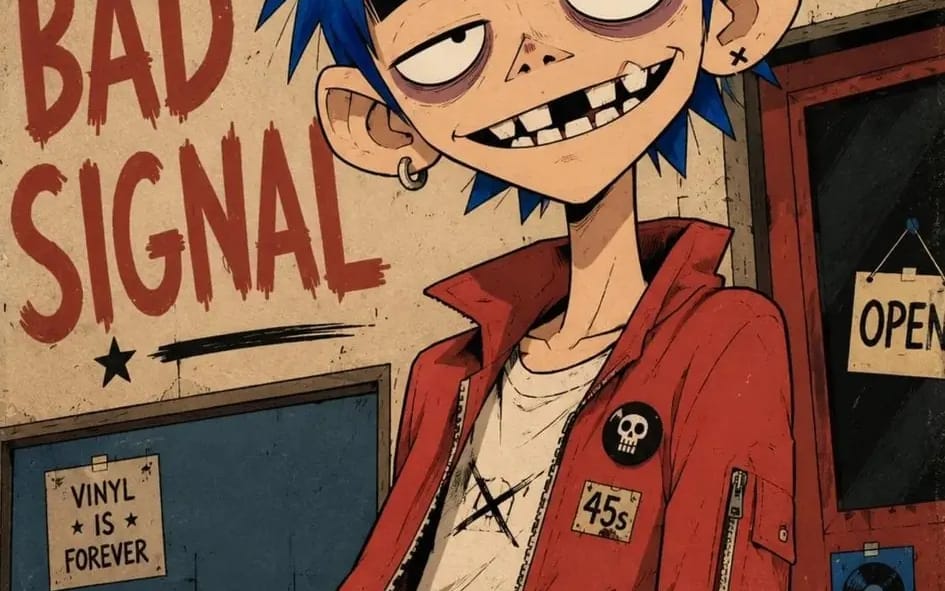
Two-dimensional alternative character illustration of [Character Name], occupying approximately seventy-five percent of the frame in [Pose], with [Hair Style] and [Expression]. Oversized rounded cranium, a short flattened lower face, a...
プロンプト
Two-dimensional alternative character illustration of [Character Name], occupying approximately seventy-five percent of the frame in [Pose], with [Hair Style] and [Expression]. Oversized rounded cranium, a short flattened lower face, a narrow jaw, a long thin neck, slightly oversized ears, huge pale oval eyes with tiny off-center pupils, extremely thick horizontal black eyebrows, heavy black upper eyelids, muted mauve under-eye rings, a tiny broad triangular nose, and a wide asymmetrical grin showing individually drawn irregular rectangular teeth, one clearly missing upper tooth, one chipped tooth and deep black gaps. Dress the character in [Clothing], simplified into broad graphic shapes with chunky seams, minimal folds and small hand-drawn accessories. Confident black ink contours using thick outer silhouettes, medium-weight facial lines, thin angular hair strands and only a few short scratch marks around the eyes, hair and clothing seams; use flat opaque color fields, one hard-edged cel-shadow shape per form, sparse pencil hatching, subtle ink wobble, slight color misregistration and restrained worn-paper texture. Controlled [Color Palette] palette, keeping every color clearly separated and moderately saturated. Place the character against [Background], reduced to large flat shapes, a few loosely drawn environmental details and oversized rough hand-painted lettering reading “[Text]”; use an off-center waist-up composition, a slight camera tilt, cropped background typography, loose poster margins and lightly weathered printed edges. 4:5 AR.
このプロンプトの使い方
- 1プロンプトをそのままコピーし、好みのモデルまたは Ideart プロジェクトに貼り付けます。
- 2商品、被写体、対象者、スタイルの詳細を自分のコンテキストに置き換えます。
- 3まず基準結果を生成し、最も強い方向性をキャンペーン、画像セット、動画コンセプトへリミックスします。
このプロンプトから作成
画像 プロンプトを完成したクリエイティブプロジェクトに変換します。
プロンプトを保存し、参照画像やメモを追加して、Ideart に同じクリエイティブスレッドから次の制作ステップを形にさせます。