
Use the uploaded product image as the single source of truth
Use the uploaded product image as the single source of truth. Silently analyze the product’s category, function, audience, silhouette, proportions, materials, surface finish, signature geometry, colors, packaging, typography, logo...
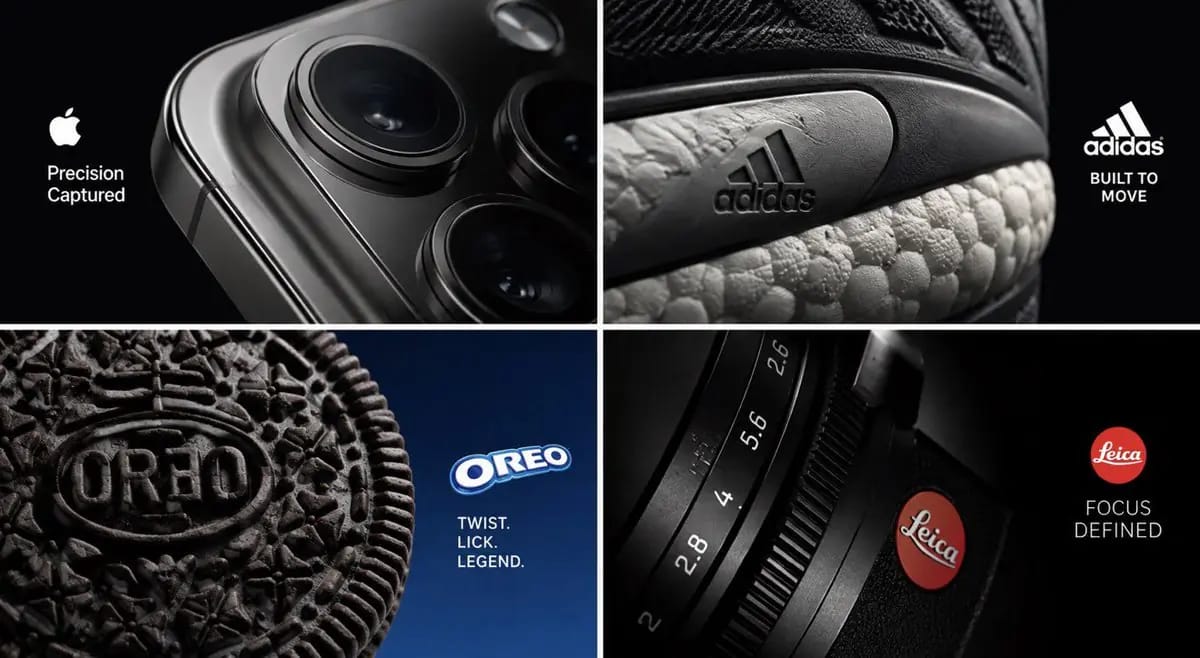
プロンプト
アップロードされた製品画像を唯一の真実のソースとして使用します。

製品のカテゴリ、機能、対象、シルエット、比率、材料、表面仕上げ、シグネチャー幾何学、色、パッケージ、タイポグラフィ、ロゴの動作、そして最も瞬時に認識できる物理的な詳細を静かに分析します。

コアコンセプト — クロップトラップ:

実際の製品の極端で意図的なクロップを使用して、1つのプレミアムキャンペーン画像を作成します。

製品全体を表示することに依存しないでください。

代わりに、非常に所有感のある詳細を特定し、それを強くフレーミングして、全体のビジュアルアイデアにします。

視聴者はまず、印象的な抽象的構成を見て、次に見慣れた製品を見ていることに気づくべきです。

可能なヒーロー詳細:

— テクノロジー広告の支配的な幾何学となるカメラモジュール
— スニーカーのソールエッジ、ステッチシステム、エアユニット、または素材の遷移がフレームを埋める
— 極端なマクロ写真を通じてグラフィック構成となるエンボスされたクッキーパターン
— 画像を支配するカメラシャッター、レンズリング、ダイヤル、または刻印されたマーク
— 香水のキャップ、ガラスのエッジ、ジュエリーのクラスプ、ボトルの肩、時計のクラウン、キーボードのキー、グリルパターン、ジッパー、ステッチ、またはパッケージの継ぎ目

詳細を別のオブジェクトに変換しないでください。

視覚的インパクトは、フレーミング、フレーム内のスケール、カメラの位置、ライティング、深度、素材のリアリズム、構成から純粋に生じる必要があります。

クロップロジック:

認識可能な詳細を1つだけ選択します。

必要に応じて、製品を部分的にフレームの外に配置します。

クロップは意図的で、大胆で、プレミアムに感じられるべきであり、偶然や単にズームインしたものではありません。

エッジ、カーブ、対角線、開口部、反射、ネガティブスペースを使用して、強い視覚的階層を構築します。

構成の少なくとも1つのセクションは、ブランドコミュニケーションのための洗練されたネガティブスペースを提供する必要があります。

可視の製品詳細は、マクロスケールで完全に識別可能で物理的に信じられるものでなければなりません。

製品DNAロック:

アップロードされた製品のすべての可視部分を正確に保持します:幾何学、比率、構造、ロゴ、ラベル、タイポグラフィ、色、材料、テクスチャ、仕上げ、継ぎ目、反射、刻印、ボタン、開口部、マイクロ詳細。

再設計、再着色、再ラベル、歪み、単純化、複製、開く、損傷、変形、または機能を発明しないでください。

製品がフレームを超えて延びる場合、その実際の構造の暗示された継続を保持します。

クリエイティブラップ:

アップロードされた製品内で最も強力な5つのクロップ機会を静かに特定します。

実際の製品詳細のみを使用して、5つの根本的に異なる構成を生成します。

各構成を次の基準で評価します:

— 瞬時の視覚的インパクト
— ブランド認識
— クロップインテリジェンス
— 構成の強さ
— ネガティブスペース
— 材料のリアリズム
— 独自性
— 商業的有用性
— プレミアムアートディレクション

普通の製品のクローズアップ、eコマース写真、ランダムなズーム、混乱した抽象、または9/10未満のものに見えるものはすべて拒否します。

最も強力な最終コンセプトのみを生成します。

ブランドコミュニケーション:

ネガティブスペース内に本物のブランドロゴを自然に統合します。

選択した製品の詳細または利点にインスパイアされた最大2語のオリジナルの見出しを作成します。

「クロップトラップ」を再利用しないでください。

ブランドの本物のタイポグラフィ、間隔、スケール、ウェイト、配置、色、視覚的トーンに合わせます。

構成:

1つの実際のヒーロー製品、1つの支配的なクロップされた詳細、非対称のエディトリアルフレーミング、洗練されたネガティブスペース、シネマティックな商業ライティング、リアルなマクロ深度、正確な反射、触覚的なマイクロ詳細、プレミアムな素材レンダリング、強い幾何学、そしてクリーンな階層。

16:9。1つのスタンドアロンキャンペーン画像。

グリッドなし、コラージュなし、分割画面なし、ミニチュアワールドなし、製品の複製なし、オブジェクトの変換なし、環境の占有なし、断面なし、浮遊するタイポグラフィなし、インフォグラフィックアイコンなし、矢印なし、無関係な小道具なし、モックアッププレゼンテーションなし、ランダムなテキストなし。
このプロンプトの使い方
- 1プロンプトをそのままコピーし、好みのモデルまたは Ideart プロジェクトに貼り付けます。
- 2商品、被写体、対象者、スタイルの詳細を自分のコンテキストに置き換えます。
- 3まず基準結果を生成し、最も強い方向性をキャンペーン、画像セット、動画コンセプトへリミックスします。
このプロンプトから作成
画像 プロンプトを完成したクリエイティブプロジェクトに変換します。
プロンプトを保存し、参照画像やメモを追加して、Ideart に同じクリエイティブスレッドから次の制作ステップを形にさせます。