
ヴィンテージ風クリーチャー・コンセプトアートシート
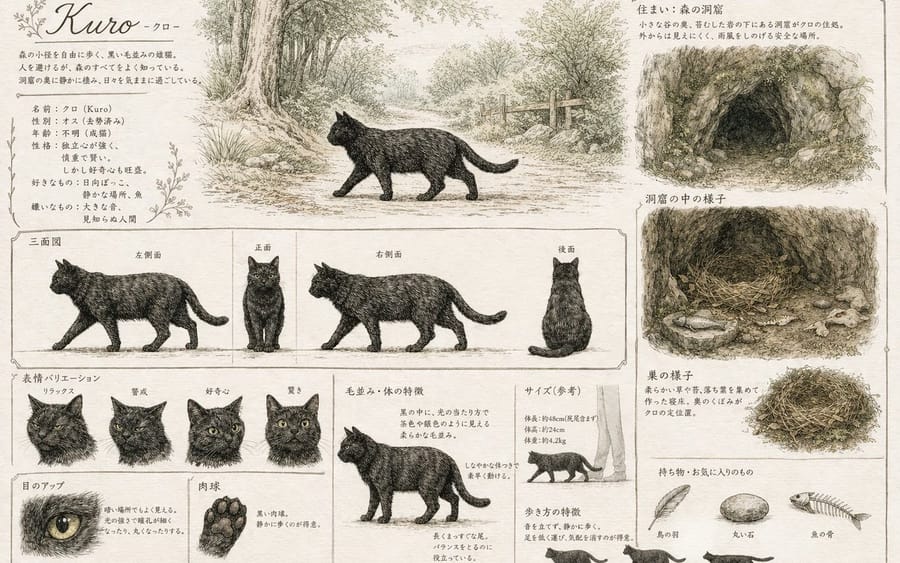
動物やクリーチャーのヴィンテージ風詳細リファレンスシートを生成します。三面図、表情、生息地のスケッチ、持ち物リストなどが含まれます。
プロンプト
{
  "type": "クリーチャー・コンセプトアート・リファレンスシート",
  "style": "{argument name=\"art style\" default=\"羊皮紙に淡い水彩をのせたヴィンテージ風鉛筆スケッチ\"}",
  "subject": {
    "name": "{argument name=\"creature name\" default=\"Kuro\"}",
    "species": "{argument name=\"creature species\" default=\"黒猫\"}"
  },
  "layout": {
    "sections": [
      {
        "title": "森の小径の黒猫 Kuro -クロ-",
        "position": "top-left",
        "description": "植物の装飾をあしらったプロフィールテキストブロック"
      },
      {
        "title": "メインイラスト",
        "position": "top-center",
        "description": "森の小道を歩く猫"
      },
      {
        "title": "住まい:森の洞窟",
        "position": "top-right",
        "description": "{argument name=\"habitat type\" default=\"森の洞窟\"} の外観"
      },
      {
        "title": "洞窟の中の様子",
        "position": "mid-right",
        "description": "巣と魚が描かれた内部の様子"
      },
      {
        "title": "三面図",
        "position": "middle",
        "count": 4,
        "labels": ["左側面", "正面", "右側面", "後面"],
        "description": "水平方向のガイドライン付きの三面図"
      },
      {
        "title": "表情バリエーション",
        "position": "bottom-left",
        "count": 4,
        "labels": ["リラックス", "警戒", "好奇心", "驚き"]
      },
      {
        "title": "詳細",
        "position": "bottom-left",
        "count": 2,
        "labels": ["目のアップ", "肉球"],
        "description": "目と肉球のクローズアップ"
      },
      {
        "title": "毛並み・体の特徴",
        "position": "bottom-center",
        "count": 1,
        "description": "全身の解剖学的構造の分解図"
      },
      {
        "title": "サイズ(参考)",
        "position": "bottom-right",
        "count": 1,
        "description": "人間の足との対比によるサイズ比較"
      },
      {
        "title": "歩き方の特徴",
        "position": "bottom-right",
        "count": 3,
        "description": "歩行サイクルの小さなシルエット"
      },
      {
        "title": "巣の様子",
        "position": "bottom-right",
        "count": 1,
        "description": "巣の詳細スケッチ"
      },
      {
        "title": "持ち物・お気に入りのもの",
        "position": "bottom-right",
        "count": 3,
        "labels": ["鳥の羽", "丸い石", "魚の骨"],
        "description": "{argument name=\"favorite items\" default=\"鳥の羽、丸い石、魚の骨\"} のコレクション"
      }
    ]
  }
}このプロンプトの使い方
- 1プロンプトをそのままコピーし、好みのモデルまたは Ideart プロジェクトに貼り付けます。
- 2商品、被写体、対象者、スタイルの詳細を自分のコンテキストに置き換えます。
- 3まず基準結果を生成し、最も強い方向性をキャンペーン、画像セット、動画コンセプトへリミックスします。
このプロンプトから作成
画像 プロンプトを完成したクリエイティブプロジェクトに変換します。
プロンプトを保存し、参照画像やメモを追加して、Ideart に同じクリエイティブスレッドから次の制作ステップを形にさせます。