
YouTube ダークモード デスクトップ UI モックアップ
デスクトップ OS 上のダークモードにおける動画ストリーミングホームページの詳細な UI モックアップ。Web デザインの参考やレイアウト生成に役立ちます。
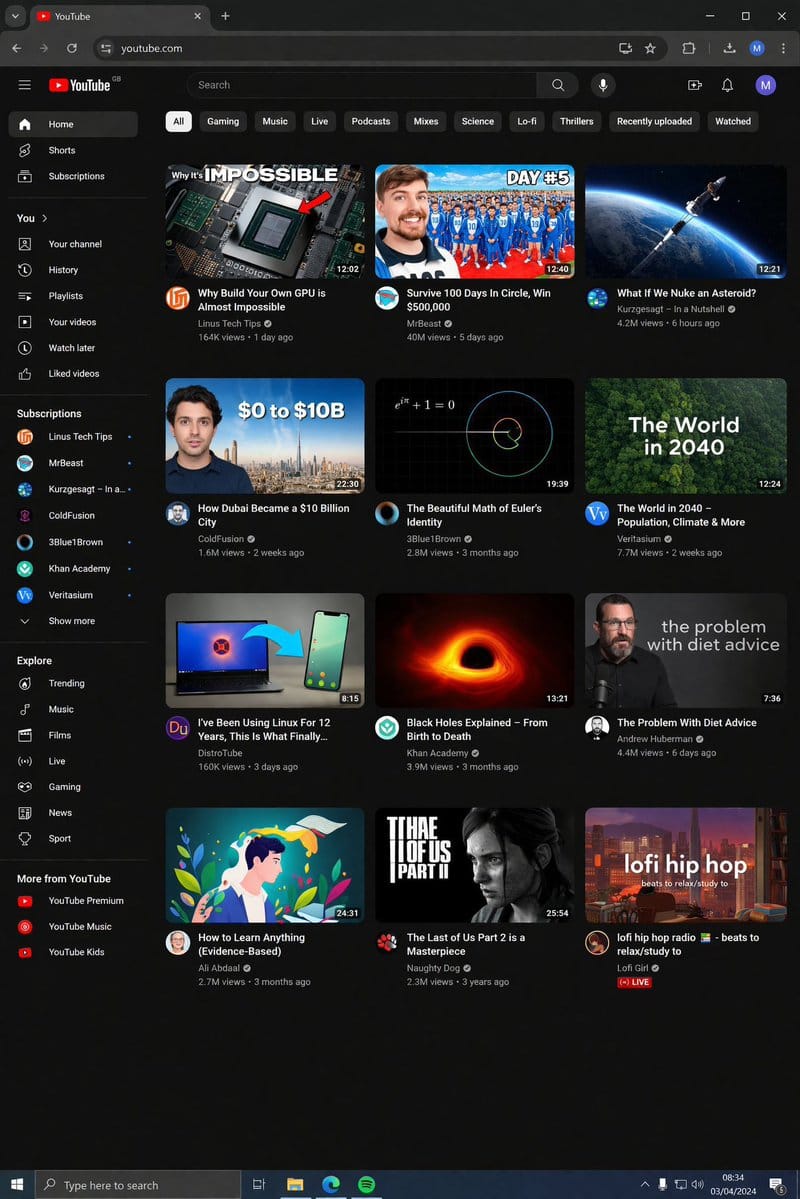
プロンプト
{
  "type": "デスクトップ Web ブラウザ UI スクリーンショット",
  "environment": "{argument name=\"os environment\" default=\"Windows 11 デスクトップ\"}",
  "theme": "{argument name=\"ui theme\" default=\"ダークモード\"}",
  "browser_window": {
    "tabs": ["YouTube", "新しいタブ"],
    "url_bar": "youtube.com",
    "profile_icon": "{argument name=\"profile initial\" default=\"M\"}"
  },
  "app_interface": {
    "header": {
      "logo": "{argument name=\"website name\" default=\"YouTube\"} GB",
      "search_bar": "検索",
      "icons": ["マイク", "作成", "通知", "プロフィール"]
    },
    "filter_bar": {
      "active_filter": "{argument name=\"active filter\" default=\"すべて\"}",
      "count": 11,
      "labels": ["すべて", "ゲーム", "音楽", "ライブ", "ポッドキャスト", "ミックス", "科学", "Lo-fi", "スリラー", "最近アップロードされた動画", "視聴済み"]
    },
    "sidebar": {
      "sections": [
        { "title": "メイン", "count": 3, "labels": ["ホーム", "Shorts", "登録チャンネル"] },
        { "title": "You", "count": 6, "labels": ["マイチャンネル", "履歴", "再生リスト", "自分の動画", "後で見る", "高評価動画"] },
        { "title": "登録チャンネル", "count": 8, "labels": ["Linus Tech Tips", "MrBeast", "Kurzgesagt - In a Nutshell", "ColdFusion", "3Blue1Brown", "Khan Academy", "Veritasium", "もっと見る"] },
        { "title": "探索", "count": 7, "labels": ["急上昇", "音楽", "映画", "ライブ", "ゲーム", "ニュース", "スポーツ"] },
        { "title": "YouTube のその他のサービス", "count": 3, "labels": ["YouTube Premium", "YouTube Music", "YouTube Kids"] }
      ]
    },
    "main_content": {
      "layout": "3 列 4 行のグリッド",
      "count": 12,
      "video_cards": [
        { "title": "Why Build Your Own GPU is Almost Impossible", "channel": "Linus Tech Tips", "stats": "16.4 万回視聴 • 1 日前", "thumbnail": "CPU/GPU チップ" },
        { "title": "Survive 100 Days In Circle, Win $500,000", "channel": "MrBeast", "stats": "4,000 万回視聴 • 5 日前", "thumbnail": "青いジャージを着た群衆と MrBeast" },
        { "title": "What If We Nuke an Asteroid?", "channel": "Kurzgesagt - In a Nutshell", "stats": "420 万回視聴 • 6 時間前", "thumbnail": "宇宙で小惑星に衝突するミサイル" },
        { "title": "How Dubai Became a $10 Billion City", "channel": "ColdFusion", "stats": "160 万回視聴 • 2 週間前", "thumbnail": "男性とドバイのスカイライン" },
        { "title": "The Beautiful Math of Euler's Identity", "channel": "3Blue1Brown", "stats": "280 万回視聴 • 3 か月前", "thumbnail": "数式と螺旋グラフ" },
        { "title": "The World in 2040 - Population, Climate & More", "channel": "Veritasium", "stats": "770 万回視聴 • 2 週間前", "thumbnail": "緑豊かな森の航空写真" },
        { "title": "I've Been Using Linux For 12 Years, This Is What Finally...", "channel": "DistroTube", "stats": "16 万回視聴 • 3 日前", "thumbnail": "Linux ロゴが表示されたノートパソコンとスマートフォン" },
        { "title": "Black Holes Explained - From Birth to Death", "channel": "Khan Academy", "stats": "390 万回視聴 • 3 か月前", "thumbnail": "輝くブラックホールの降着円盤" },
        { "title": "The Problem With Diet Advice", "channel": "Andrew Huberman", "stats": "440 万回視聴 • 6 日前", "thumbnail": "眼鏡をかけて話す男性" },
        { "title": "How to Learn Anything (Evidence-Based)", "channel": "Ali Abdaal", "stats": "270 万回視聴 • 3 か月前", "thumbnail": "本を読む男性のベクターイラスト" },
        { "title": "The Last of Us Part 2 is a Masterpiece", "channel": "Naughty Dog", "stats": "230 万回視聴 • 3 年前", "thumbnail": "The Last of Us のエリー" },
        { "title": "lofi hip hop radio - beats to relax/study to", "channel": "Lofi Girl", "stats": "ライブ", "thumbnail": "机で勉強する Lofi Girl" }
      ]
    }
  },
  "taskbar": {
    "os": "Windows",
    "icons": ["スタート", "検索", "タスクビュー", "エクスプローラー", "Edge", "Spotify"],
    "system_tray": "08:34 2024 年 4 月 3 日"
  }
}このプロンプトの使い方
- 1プロンプトをそのままコピーし、好みのモデルまたは Ideart プロジェクトに貼り付けます。
- 2商品、被写体、対象者、スタイルの詳細を自分のコンテキストに置き換えます。
- 3まず基準結果を生成し、最も強い方向性をキャンペーン、画像セット、動画コンセプトへリミックスします。
このプロンプトから作成
画像 プロンプトを完成したクリエイティブプロジェクトに変換します。
プロンプトを保存し、参照画像やメモを追加して、Ideart に同じクリエイティブスレッドから次の制作ステップを形にさせます。