
ImageGPT Image 2
AI Model Portrait Comparison
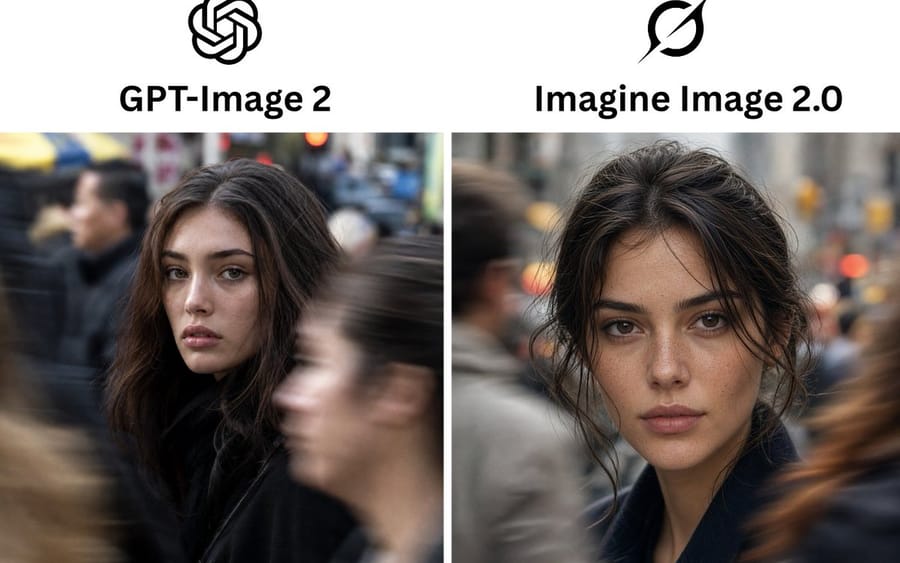
Creates a side-by-side social media comparison graphic of two AI image models using realistic urban portrait outputs.
Prompt
Goal: Create a clean side-by-side comparison graphic showing two AI image model outputs as realistic street portraits.

Canvas: Horizontal 3:2 social media comparison image, white background, high resolution. Use a simple two-column layout with a narrow vertical white divider between the image panels.

Layout: Top header area contains exactly 2 black logos centered above exactly 2 bold model names. Left column: OpenAI knot logo above the heading “{argument name="left model name" default="GPT-Image 2"}”. Right column: Grok-style black circular slash logo above the heading “{argument name="right model name" default="Imagine Image 2.0"}”. Below the headers are exactly 2 equal-size rectangular photo panels: one on the left and one on the right.

Photo content: Both panels show a cinematic, photorealistic urban street portrait of the same young woman in a crowded city. She has {argument name="hair color" default="dark brown"} hair, natural makeup, full brows, soft lips, and a calm direct gaze. She wears a dark coat. The background is a busy city sidewalk with motion-blurred pedestrians, shallow depth of field, muted gray urban tones, and warm bokeh traffic lights.

Left photo panel: The woman is slightly left of center, turned partly toward the camera, with loose voluminous hair around her face. A large blurred pedestrian crosses the foreground on the right, partially obscuring the lower face/body area; another blurred figure appears on the left. The image should feel like a candid real-camera street photograph with natural imperfections and documentary realism.

Right photo panel: The woman is centered closer to camera, facing forward with slightly tousled hair pulled back loosely and face-framing strands. Her facial detail is sharper and more polished, with visible skin texture and freckles. Blurred pedestrians pass on both sides, including a gray figure on the left and a warm brown motion blur on the right.

Visual style: Photorealistic DSLR street photography, natural light, shallow depth of field, 50mm lens feel, realistic skin texture, subtle filmic color grading, high detail in faces, strong motion blur on passing pedestrians, no illustration style.

Text and element count: Include exactly 2 logos, exactly 2 headings, exactly 2 photo panels, and exactly 2 main female portraits. Do not add extra captions, scores, labels, borders, watermarks, or interface elements.How to use this prompt
- 1Copy the prompt exactly, then paste it into your preferred model or Ideart project.
- 2Replace product, subject, audience, and style details with your own context.
- 3Generate one baseline result first, then remix the strongest direction into a campaign, image set, or video concept.
Build from this prompt
Turn a image prompt into a finished creative project.
Save the prompt, add reference images or notes, and let Ideart shape the next production step from the same creative thread.