
ImageAI
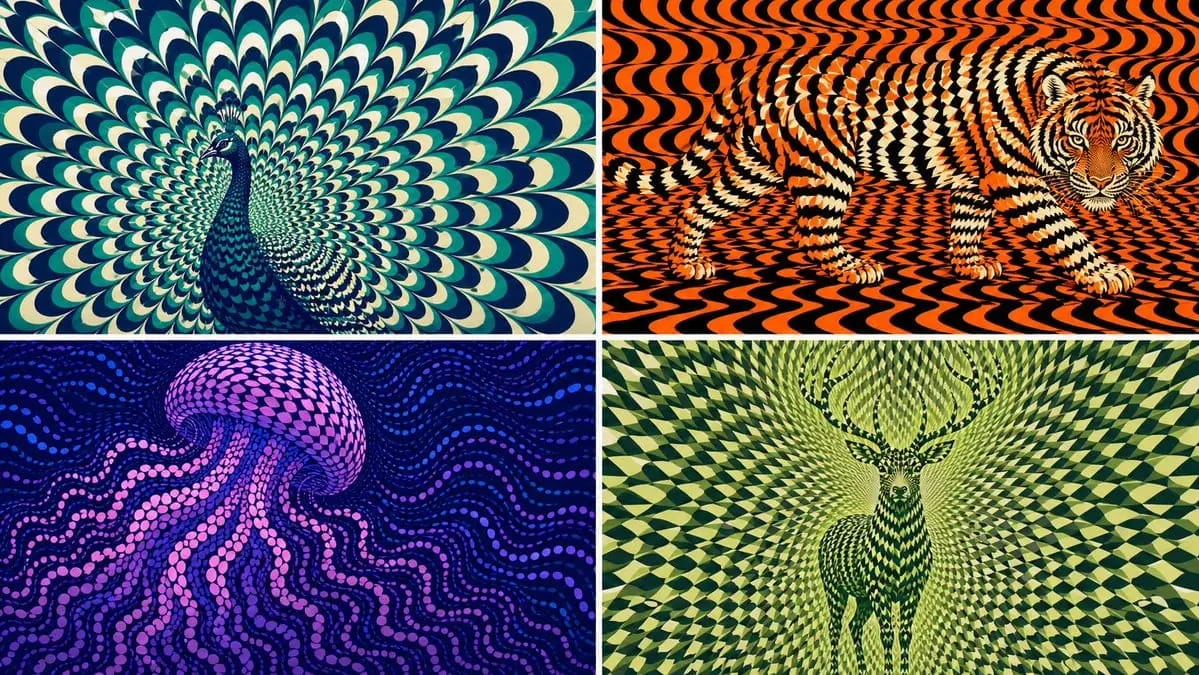
2x2 grid, 16:9 AI picks subjects class OpArtSubjectField
2x2 grid, 16:9 AI picks subjects class OpArtSubjectField: def __init__(self, subject="[Subject]", palette="[Palette]"): self. style = "high-contrast optical art, kinetic poster, graphic abstraction" self.canvas = "full-bleed pattern...
Prompt
2x2 grid, 16:9 AI picks subjects class OpArtSubjectField: def __init__(self, subject="[Subject]", palette="[Palette]"): self. style = "high-contrast optical art, kinetic poster, graphic abstraction" self.canvas = "full-bleed pattern field" self.subject = subject self.palette = AI_INFER("3-5 colors that match SUBJECT mood, habitat, symbolism, or brand energy") def infer_subject_silhouette(self): return AI_INFER( "the most recognizable silhouette, posture, outline, or profile of SUBJECT" ) def build_pattern_field(self): return """ Fill the entire canvas with hundreds or thousands of repeated units. Units may be petals, scales, tiles, crescents, stripes, waves, discs, feathers, blades, shards, or glyph-like marks. The subject is not outlined directly. The subject emerges because the repeated units change scale, direction, spacing, brightness, and color inside the subject zone. Background units continue the same visual language but flow differently. """ def illusion_rules(self): return """ From far away: SUBJECT must be readable. From close up: only repeated abstract units are visible. No hard outline, no direct drawing, no pasted silhouette. The pattern itself carries the shape. """ # EXECUTE: # Render SUBJECT as a kinetic Op Art field where repeated units form the hidden figure.How to use this prompt
- 1Copy the prompt exactly, then paste it into your preferred model or Ideart project.
- 2Replace product, subject, audience, and style details with your own context.
- 3Generate one baseline result first, then remix the strongest direction into a campaign, image set, or video concept.
Explore nearby prompt paths
Model
Build from this prompt
Turn a image prompt into a finished creative project.
Save the prompt, add reference images or notes, and let Ideart shape the next production step from the same creative thread.