
ImageAI
Aspect Ratio :9:16
【主题】:[主题] 【主体类型】:[主体类型] 【主体内容】:[主体内容] 【中文标题】:[中文标题] 【英文标题】:[英文标题] 【对角方式】:[对角方式] 【主轴方向】:[主轴方向] 【配色】:[配色] 【日期 / 机构】:[日期机构] 【比例】:9:16 生成一张具有强设计感的对角构图海报。 先建立一条清晰的斜向视觉主轴,再围绕这条主轴组织主体、Typography 和留白,而不是先堆装饰元素。 让主体本身形成对角势能:...
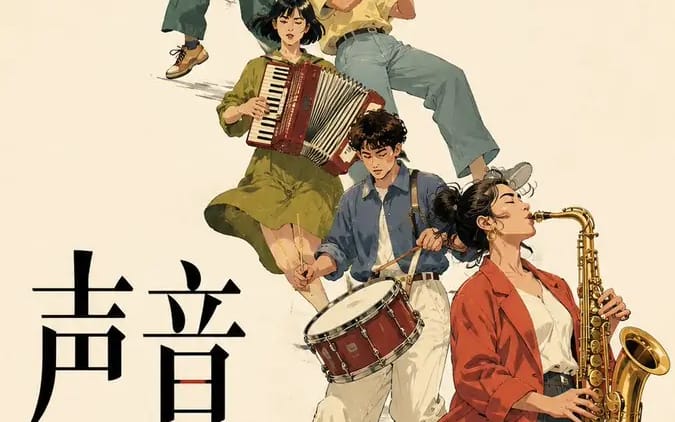
Prompt
【Theme】:[Theme]
【Subject Type】:[Subject Type]
【Subject Content】:[Subject Content]
【Chinese Title】:[Chinese Title]
【English Title】:[English Title]
【Diagonal Method】:[Diagonal Method]
【Main Axis Direction】:[Main Axis Direction]
【Color Scheme】:[Color Scheme]
【Date / Institution】:[Date Institution]
【Aspect Ratio】:9:16

Generate a poster with a strong sense of design using a diagonal composition.

First establish a clear diagonal visual axis, then organize the subject, typography, and white space around this axis, rather than stacking decorative elements first.

Let the subject itself form a diagonal momentum:
For group portraits, use character actions, sizes, and arrangements to create a continuous diagonal movement;
For spatial types, use architectural sections, perspective, and light and shadow to create a diagonal convergence;
For typography types, use large text advancing along the diagonal axis, enlarging, cropping, and overlapping;
For single-object types, use the object's own contour, center of gravity, and tilted posture to naturally form a diagonal tendency.

Keep only one main visual direction in the entire image; other elements only follow or balance it, without creating new visual competition.

The subject bears the main visual weight, leaving 25%–40% white space. The Chinese title serves as the visual focal point, while small English text and date information are concentrated in 1–2 information zones. Use 2–4 colors, and enhance tension through scale, cropping, overlapping, and asymmetrical layout.

The key is not to "draw a diagonal line," but to let the subject, text, and white space together form a diagonal reading path.

Editorial Graphic Design, mature, restrained, clear, and tense, like a real cultural exhibition poster.
How to use this prompt
- 1Copy the prompt exactly, then paste it into your preferred model or Ideart project.
- 2Replace product, subject, audience, and style details with your own context.
- 3Generate one baseline result first, then remix the strongest direction into a campaign, image set, or video concept.
Explore nearby prompt paths
Model
Build from this prompt
Turn a image prompt into a finished creative project.
Save the prompt, add reference images or notes, and let Ideart shape the next production step from the same creative thread.