
ImageGPT Image 2
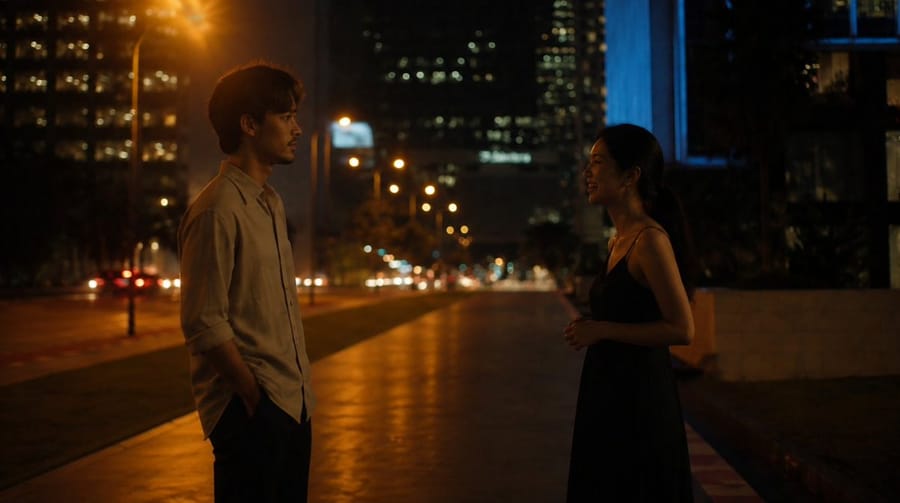
Cinematic Night Street Conversation
Generates a moody widescreen film-still scene of two young adults talking on a city sidewalk at night for romantic short-film storyboards.
Prompt
Create a cinematic widescreen night scene in the style of an intimate romantic indie film, similar to a quiet conversation moment from Before Sunrise. On a city sidewalk at night, show exactly two young adults facing each other at a slight distance: a man on the left wearing a light beige button-up shirt with sleeves rolled up and dark trousers, one hand in his pocket, and a woman on the right wearing a simple black sleeveless dress, her dark hair tied back, hands loosely clasped near her waist. Use {argument name="city setting" default="a modern downtown street with high-rise buildings"} in the background, with glowing office windows, distant traffic, blurred car headlights and taillights, and warm orange streetlights reflecting on the pavement. Compose as a wide 16:9 film still, both characters in profile or three-quarter silhouette, separated by an empty walkway leading into the depth of the frame. Lighting should be low-key and atmospheric: warm amber light from the left streetlamp, cooler blue light from a building on the right, soft bokeh, shallow depth of field, natural shadows, subdued contrast, realistic skin tones, and a moody late-night urban palette. Make it look like a real live-action movie frame shot on an anamorphic lens, with cinematic grain, soft focus falloff, no visible text, no watermark, no extra people in the foreground. Parameterize the mood as {argument name="emotional tone" default="quiet, tentative, romantic tension"}, the man as {argument name="male character" default="young Asian man in a beige shirt"}, the woman as {argument name="female character" default="young Asian woman in a black dress"}, and the camera feel as {argument name="cinematography style" default="naturalistic handheld indie film still"}.How to use this prompt
- 1Copy the prompt exactly, then paste it into your preferred model or Ideart project.
- 2Replace product, subject, audience, and style details with your own context.
- 3Generate one baseline result first, then remix the strongest direction into a campaign, image set, or video concept.
Explore nearby prompt paths
Model
Build from this prompt
Turn a image prompt into a finished creative project.
Save the prompt, add reference images or notes, and let Ideart shape the next production step from the same creative thread.