
ImageNano Banana Pro
Cinematic Scene Generation for Video Input
This tweet uses Nano Banana Pro to generate a single scene image, which is then used as input for a video generation model (Kling 3.0 Omni). The prompt is shared and was used for both image and video generation.
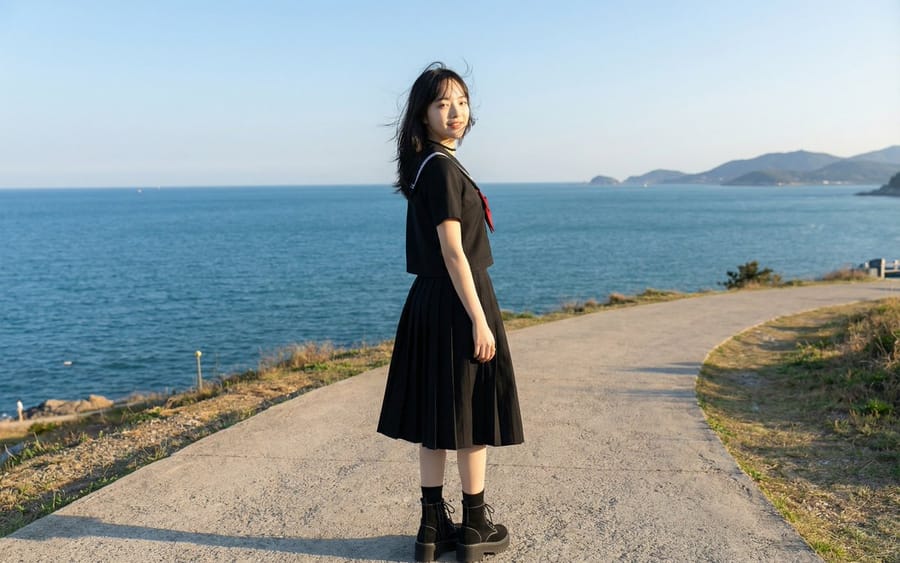
Prompt
{"title":"Cinematic Scene Generation for Video Input","description":"This tweet uses Nano Banana Pro to generate a single scene image, which is then used as input for a video generation model (Kling 3.0 Omni). The prompt is shared and was used for both image and video generation.","content":"A girl wearing a black sailor uniform with a red ribbon and black boots traverses a cinematic scene through a seaside slope under a blue sky, a shrine with dappled sunlight, an old alley with cobblestones, a park on a high point with a good view, and a breakwater at dusk. Capturing her charming gestures, such as her hair swaying in the sea breeze as she innocently smiles, a slightly shy wink, skipping lightly while her skirt flutters, and a childlike expression resting her chin on her hand on a bench. Finally, with a beautiful sunset behind her, she runs over waving her hand with a full smile, creating a refreshing visual filled with transparency and emotional joy."}How to use this prompt
- 1Copy the prompt exactly, then paste it into your preferred model or Ideart project.
- 2Replace product, subject, audience, and style details with your own context.
- 3Generate one baseline result first, then remix the strongest direction into a campaign, image set, or video concept.
Explore nearby prompt paths
Model
Categories
Build from this prompt
Turn a image prompt into a finished creative project.
Save the prompt, add reference images or notes, and let Ideart shape the next production step from the same creative thread.