
ImageNano Banana Pro
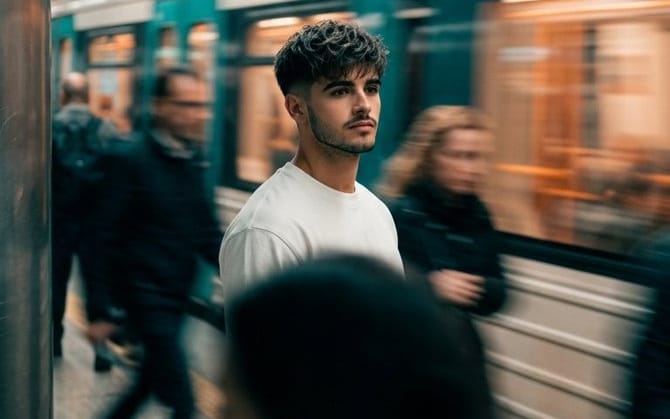
Cinematic Subway Motion Blur Portrait
A detailed cinematic prompt for generating a sharp subject against a blurred urban subway background using long exposure effects.
Prompt
Cinematic urban scene of a man as per reference photo standing still on a subway platform while a train speeds by, motion blur from the train and people passing by surrounds him, the subject remains sharp and still. Composition: subject is in the center, strong contrast between stillness and movement, blurred foreground silhouette, dynamic background streaks. Environment: subway station, urban setting, moving train with light trails, moving crowd, city atmosphere. Lighting: mixed ambient lighting, soft artificial light, subtle glow from train windows, cinematic shadow depth. Details: motion blur on trains and people, slight grain, realistic clothing textures, natural body postures, environmental reflections. Art style: cinematic realism, film still photography, high dynamic range (HDR), natural imperfections. Color grading: {argument name="shadow color" default="deep teal/dark cyan"} shadows across the background and moving areas, neutral cool midtones, warm {argument name="highlight color" default="dusty orange"} highlights from the train lights and motion trails, cinematic contrast. Camera: 35mm lens, slow shutter effect, shallow depth of field. Mood: lonely, introspective, urban, fast-paced world vs. calm mind, cinematic. Quality: very detailed, 4k, motion blur, film grain, fine bloom. Aspect ratio: 9:16. Long exposure effect, cinematic light streaks, subtle lens blur, analog film texture, soft glow highlights.How to use this prompt
- 1Copy the prompt exactly, then paste it into your preferred model or Ideart project.
- 2Replace product, subject, audience, and style details with your own context.
- 3Generate one baseline result first, then remix the strongest direction into a campaign, image set, or video concept.
Explore nearby prompt paths
Model
Build from this prompt
Turn a image prompt into a finished creative project.
Save the prompt, add reference images or notes, and let Ideart shape the next production step from the same creative thread.