
ImageGPT Image 2
Convert Copilot cat image to pixel art
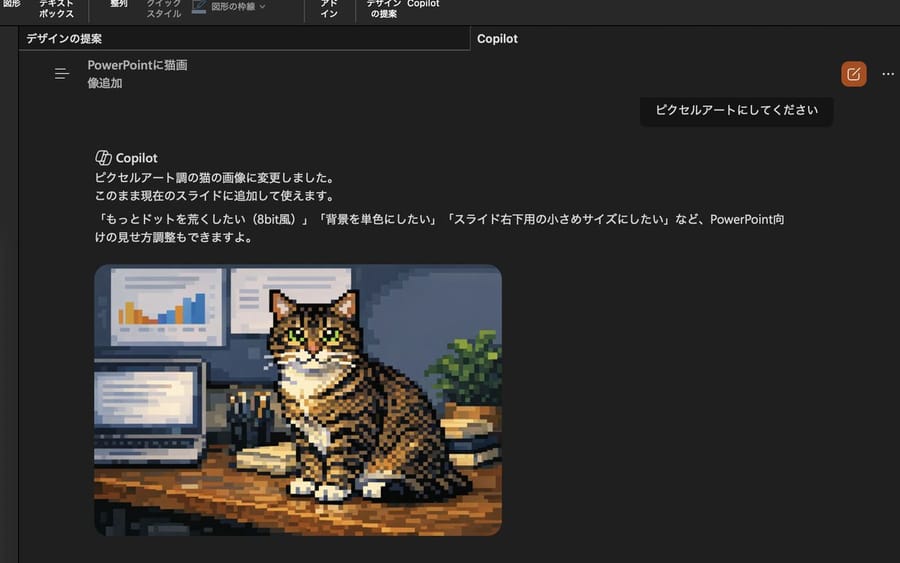
This prompt turns the generated cat photo inside a PowerPoint Copilot screenshot into pixel art and updates the Japanese UI text to match the new edit request.
Prompt
Using the provided reference image, transform only the inserted cat photo into retro pixel art while keeping the overall PowerPoint dark-mode Copilot screenshot layout, interface, and composition unchanged. Preserve the same tabby cat, pose, desk setting, laptop, wall charts, books, and plant, but redraw that image as chunky low-resolution game-style pixel art with visible square pixels, simplified shading, and an 8-bit feel. Also update the visible Japanese Copilot request and response text so the request says 「ピクセルアートにしてください」 and the response explains that the cat image was changed to pixel-art style, with follow-up suggestions mentioning 3 options: 「もっとドットを荒くしたい(8bit風)」, 「背景を単色にしたい」, and 「スライド右下用の小さめサイズにしたい」.
How to use this prompt
- 1Copy the prompt exactly, then paste it into your preferred model or Ideart project.
- 2Replace product, subject, audience, and style details with your own context.
- 3Generate one baseline result first, then remix the strongest direction into a campaign, image set, or video concept.
Explore nearby prompt paths
Model
Build from this prompt
Turn a image prompt into a finished creative project.
Save the prompt, add reference images or notes, and let Ideart shape the next production step from the same creative thread.