
ImageAI
Create a high-contrast vintage underground editorial poster
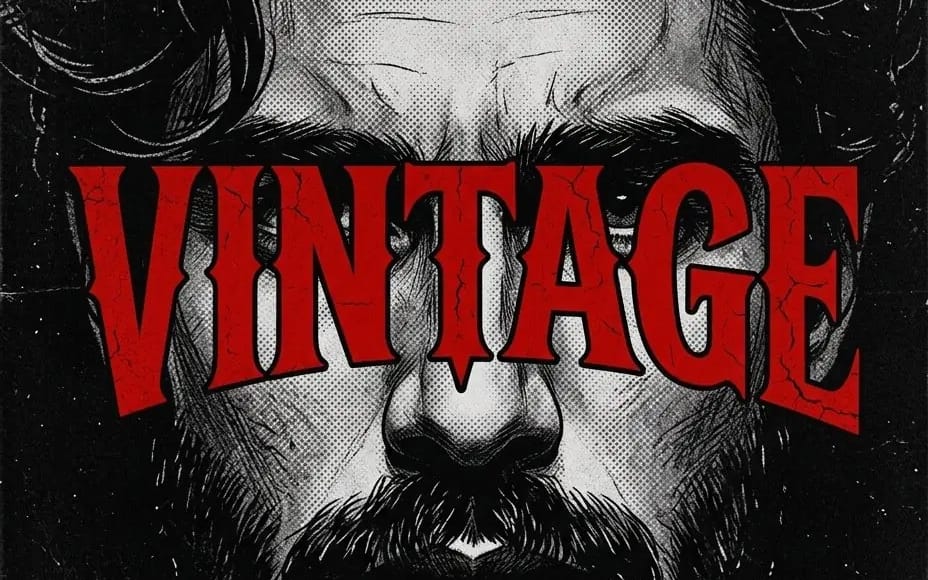
Create a high-contrast vintage underground editorial poster in a black-and-white 1970s/80s underground comic and punk-zine aesthetic. Centered is a dramatic close-up portrait of a rugged bearded man, facing directly toward the camera,...
Prompt
Create a high-contrast vintage underground editorial poster in a black-and-white 1970s/80s underground comic and punk-zine aesthetic. Centered is a dramatic close-up portrait of a rugged bearded man, facing directly toward the camera, with thick wavy dark hair, heavy eyebrows, prominent nose, full mustache and textured beard. His expression is serious, intense, and stoic.

Render the portrait entirely in black, white, and gray halftone shading, using dense stippling, cross-hatching, rough ink strokes, distressed print textures, and hand-illustrated comic-book linework. Add subtle paper grain, scratches, speckles, ink imperfections, and worn screen-print artifacts throughout.

Across the center of the face, place enormous bold red typography reading “VINTAGE”, stretching almost edge-to-edge. Use a dramatic condensed vintage serif / Western gothic display font, slightly irregular and warped, with thick black outline/shadow. The red letters should have cracked, distressed textures and small black fracture lines, giving the typography an aged, weathered print appearance.

Keep the background almost completely black with subtle grain, dust, scratches, and tiny distressed white marks. Strong symmetrical composition, frontal portrait, extreme close-up, gritty underground magazine cover aesthetic, rebellious punk poster energy, high detail, screen-print texture, analog print imperfections, dramatic contrast.

Composition: vertical poster, centered face, typography dominating the middle, face partially obscured behind the word, tightly cropped portrait.

Aspect ratio: 4:5
Style: vintage punk zine, underground comic illustration, distressed screen print, halftone engraving, monochrome ink artwork with bold blood-red typography.
How to use this prompt
- 1Copy the prompt exactly, then paste it into your preferred model or Ideart project.
- 2Replace product, subject, audience, and style details with your own context.
- 3Generate one baseline result first, then remix the strongest direction into a campaign, image set, or video concept.
Explore nearby prompt paths
Model
Build from this prompt
Turn a image prompt into a finished creative project.
Save the prompt, add reference images or notes, and let Ideart shape the next production step from the same creative thread.