
ImageAI
以 角色 / 主题 为核心
以【角色 / 主题】为核心,创作一张 复古日本街头杂志 × 未来工业科技 × 高端时尚 Editorial × 商业美妆摄影 风格的高信息密度视觉海报。 采用 9:16 竖版构图,以严格网格系统为基础,结合不规则拼贴、跨层叠加、局部裁切、悬浮窗口与图文穿插。整体具有日本潮流杂志、未来科技档案、奢侈品广告与工业产品说明书的混合气质。画面包含主视觉、局部特写、材质细节、功能模块、编号参数、条形码、警示符号与少量英文或日文排版,所有信息层级清晰、文字清晰可读。...
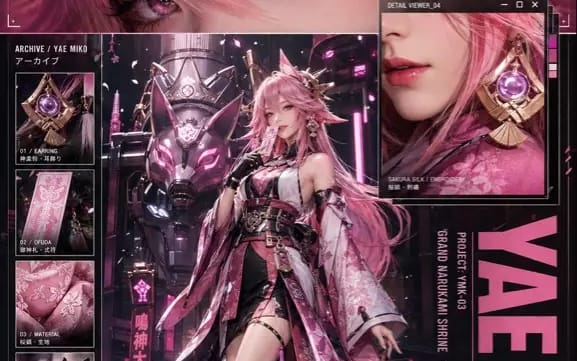
Prompt
Create a high-information-density visual poster centered around 【character / theme】, combining retro Japanese street magazine × futuristic industrial technology × high-end fashion editorial × commercial beauty photography styles.

Use a 9:16 vertical composition based on a strict grid system, incorporating irregular collages, cross-layering, partial cropping, floating windows, and interspersed text and images. The overall aesthetic blends elements of Japanese trend magazines, futuristic technology archives, luxury advertisements, and industrial product manuals. The image should include a main visual, close-ups, material details, functional modules, numbered parameters, barcodes, warning symbols, and a small amount of English or Japanese typography, with all information hierarchies clear and text easily readable.

At the top, set up a "Rational Information Zone": Automatically design close-up shots of iconic objects, equipment, vehicles, creatures, buildings, or core devices based on 【character / theme】, showcasing complex structures, material textures, signs of use, glowing components, and industrial details; add corresponding energy cores, functional modules, or thematic symbols alongside, and configure project codes, technical names, performance parameters, and short slogans.

In the middle, create a very narrow horizontal "Emotional Close-Up Zone": Extract the most recognizable visual parts of 【character / theme】, such as eyes, face, hands, masks, weapons, textures, symbols, or core components. Use ultra-close commercial photography to highlight moist reflections, realistic skin or material textures, light reflections, and intense gazes, making it a visual bridge connecting the character's emotions with the thematic worldview.

Add a floating detail window that breaks the grid in the middle or slightly to the right, automatically displaying lips, eye makeup, accessories, mechanical parts, clothing materials, weapon details, energy structures, or other visually appealing sections based on the subject. Use Beauty Macro or Product Macro close-up photography quality to showcase pores, fibers, metal wear, transparent materials, liquid reflections, or delicate highlights.

At the bottom, set up a "Main Visual Zone": Place 【character】 in the foreground in a full-body or three-quarters view, automatically designing a high-fashion look based on character settings, incorporating techwear, uniforms, functional straps, metal fasteners, modular accessories, or thematic clothing structures. The character should have excellent proportions, clear outlines, and a calm, strong body language, adopting poses such as slightly side-standing, weight on one leg, hands in pockets, lightly touching the collar, holding thematic props, or naturally controlling core devices.

Behind the character, position a massive subject corresponding to 【theme】, such as a heavy mech, futuristic vehicle, giant creature, industrial device, architectural structure, weapon system, or symbolic totem. The foreground character should obscure part of the rear subject's structure, establishing a clear spatial hierarchy of "character foreground - thematic subject midground - environmental background." The background should be automatically generated based on the theme, depicting a laboratory, hangar, urban street, underground facility, photo studio, futuristic factory, or surreal space.

On the side of the image, set up a vertical profile bar, adding multiple close-up image modules showcasing the subject's joints, materials, equipment, clothing, functional components, or iconic objects, along with technical parameters, project numbers, material descriptions, function lists, warning labels, barcodes, and publication information. On the right side, include a large main title corresponding to 【theme】, using bold sans-serif fonts, compressed fonts, or military stencil fonts, overlapping with the character and background.

Colors should automatically adapt based on the core palette of 【character / theme】, selecting a high-saturation primary color that runs through the title, lighting, partial reflections, makeup highlights, functional identifiers, and visual symbols, complemented by black, cool white, metallic gray, or low-saturation auxiliary colors, forming a unified and strong brand identity.

The overall presentation must exhibit photo-realistic commercial photography quality, with the character's skin, hair, makeup, clothing fabrics, metal, glass, plastic, and environmental materials all appearing clear and credible. Use advanced studio lighting, hard contour lighting, partial colored reflective lighting, and ambient light combined, resulting in a sharp, cool, fashionable, dangerous image with an industrial oppressive feel, resembling a Japanese limited-edition fashion technology special from a future world.
How to use this prompt
- 1Copy the prompt exactly, then paste it into your preferred model or Ideart project.
- 2Replace product, subject, audience, and style details with your own context.
- 3Generate one baseline result first, then remix the strongest direction into a campaign, image set, or video concept.
Explore nearby prompt paths
Model
Build from this prompt
Turn a image prompt into a finished creative project.
Save the prompt, add reference images or notes, and let Ideart shape the next production step from the same creative thread.