
ImageGPT Image 2
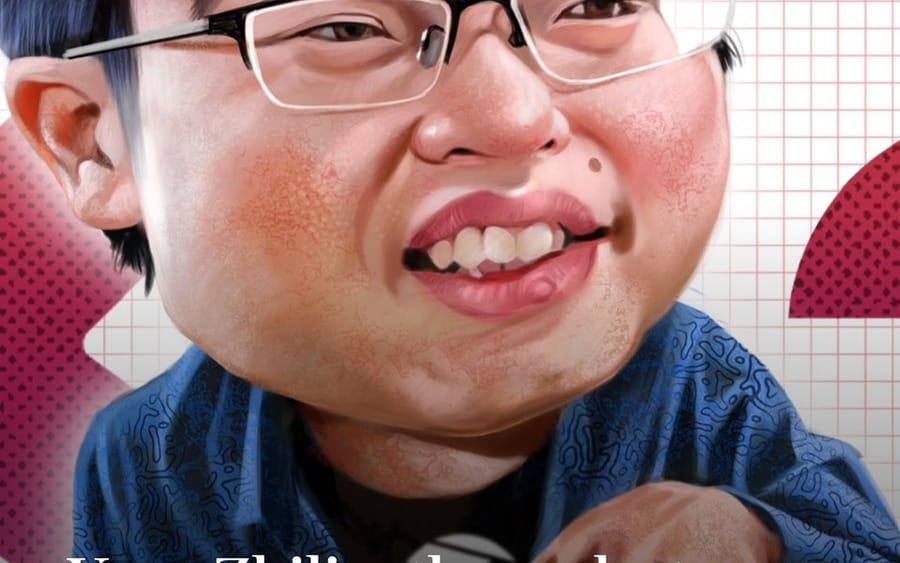
Editorial Caricature Redraw
Transforms a reference portrait illustration into a polished exaggerated editorial caricature while preserving the original layout, text, and design elements.
Prompt
Using the provided reference image, redraw it as a polished exaggerated editorial caricature while preserving the original Financial Times-style composition and all key elements. Keep the same seated-at-keyboard pose, the hands reaching toward the keyboard, the white grid-paper background, the red/pink dotted side shapes, the blue dotted rounded rectangle in the upper right, and the same lower-left headline text: {argument name="headline text" default="Yang Zhilin, the rock star founder behind China’s Moonshot AI"}. Transform the portrait into a glossy, high-detail digital caricature with an oversized head, fuller cheeks, slightly comical smile, enlarged glasses, stylized black hair, painterly skin texture, and a more satirical magazine-illustration look. Keep the crop tight and vertical, with the face much larger in frame than the reference and the text overlay still readable in large white serif type across the lower third. Maintain the keyboard along the bottom edge and do not add any new objects, logos, watermarks, or extra text.How to use this prompt
- 1Copy the prompt exactly, then paste it into your preferred model or Ideart project.
- 2Replace product, subject, audience, and style details with your own context.
- 3Generate one baseline result first, then remix the strongest direction into a campaign, image set, or video concept.
Build from this prompt
Turn a image prompt into a finished creative project.
Save the prompt, add reference images or notes, and let Ideart shape the next production step from the same creative thread.