
ImageGPT Image 2
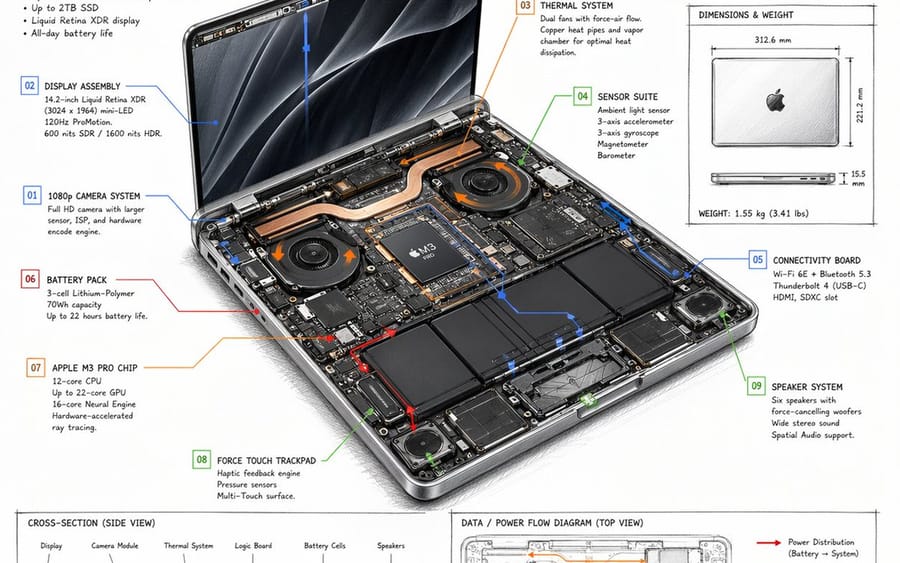
Laptop Technical Overview Infographic
A detailed, hand-drawn style technical spec sheet for a laptop, featuring internal component callouts, material tables, and flow diagrams.
Prompt
{
  "type": "technical overview infographic",
  "style": "{argument name=\"visual style\" default=\"hand-drawn technical sketch with clean typography\"}",
  "product": {
    "name": "{argument name=\"product name\" default=\"MACBOOK NEO\"}",
    "subtitle": "14-INCH {argument name=\"processor model\" default=\"M3 PRO\"} - TECHNICAL OVERVIEW"
  },
  "layout": {
    "centerpiece": {
      "description": "isometric view of an opened laptop revealing internal hardware components like dual fans, copper heat pipes, battery cells, and logic board",
      "callouts_count": 9,
      "callout_labels": [
        "01 1080p CAMERA SYSTEM",
        "02 DISPLAY ASSEMBLY",
        "03 THERMAL SYSTEM",
        "04 SENSOR SUITE",
        "05 CONNECTIVITY BOARD",
        "06 BATTERY PACK",
        "07 {argument name=\"main component\" default=\"APPLE M3 PRO CHIP\"}",
        "08 FORCE TOUCH TRACKPAD",
        "09 SPEAKER SYSTEM"
      ]
    },
    "sections": [
      {
        "title": "Header Text",
        "position": "top-left",
        "content": "Marketing blurb and 5-bullet specification list"
      },
      {
        "title": "Legend",
        "position": "top-center",
        "content": "4 color-coded arrows indicating {argument name=\"accent colors\" default=\"red, blue, orange, green\"} flow lines for Power, Data, Thermal, and Sensors"
      },
      {
        "title": "MATERIALS & QUANTITY",
        "position": "top-right",
        "type": "table",
        "rows_count": 7,
        "columns": ["#", "MATERIAL", "QTY", "NOTES"]
      },
      {
        "title": "DIMENSIONS & WEIGHT",
        "position": "mid-right",
        "content": "Top and side views of closed laptop with measurements"
      },
      {
        "title": "CROSS-SECTION (SIDE VIEW)",
        "position": "bottom-left (top half)",
        "content": "Side profile showing internal component layout with 6 labels"
      },
      {
        "title": "REAR I/O (LEFT TO RIGHT)",
        "position": "bottom-left (bottom half)",
        "content": "Side profile showing 6 ports"
      },
      {
        "title": "DATA / POWER FLOW DIAGRAM (TOP VIEW)",
        "position": "bottom-right",
        "content": "Wireframe top-down view with colored flow lines, legend, and scale bar"
      }
    ]
  }
}How to use this prompt
- 1Copy the prompt exactly, then paste it into your preferred model or Ideart project.
- 2Replace product, subject, audience, and style details with your own context.
- 3Generate one baseline result first, then remix the strongest direction into a campaign, image set, or video concept.
Explore nearby prompt paths
Model
Build from this prompt
Turn a image prompt into a finished creative project.
Save the prompt, add reference images or notes, and let Ideart shape the next production step from the same creative thread.