
ImageGemini 3 Pro
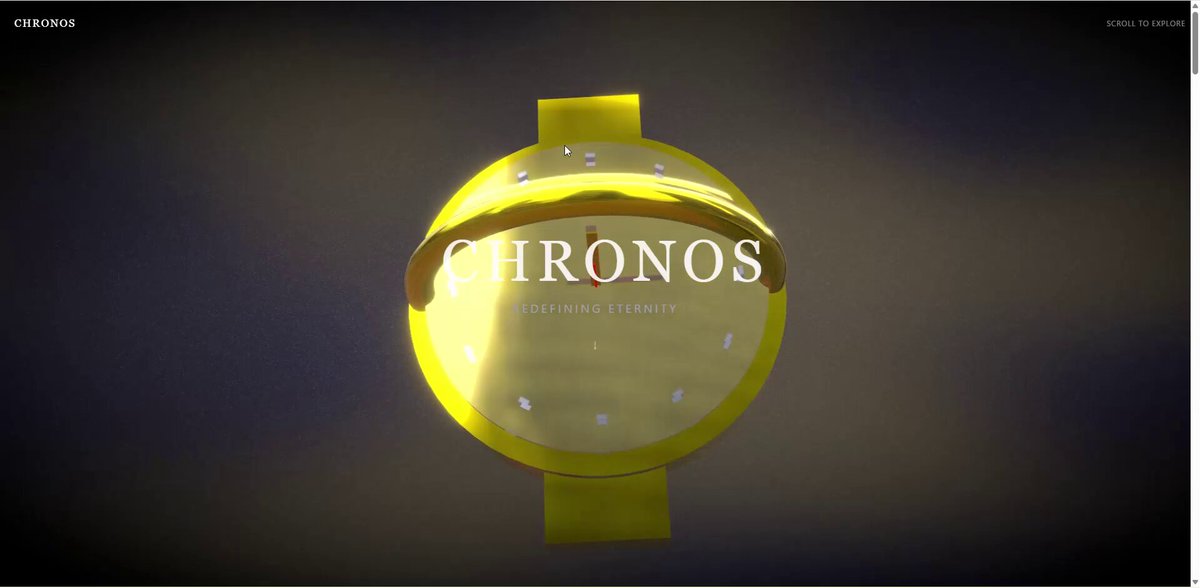
ラグジュアリー 3D ウォッチ製品体験ページ (Next.js + Three.js)
高級時計向けの豪華な 3D 製品体験ウェブページをデザインするための、詳細な日本語プロンプト。Next.js、Three.js、React Three Fiber、GLSL を使用し、特定のスクロールセクションとシェーダー要件を盛り込む。
Prompt
Design a 3D product experience page for a luxury wristwatch.
**Target users:** wealthy customers, watch enthusiasts, and business people aged 30–50.
**Brand tone:** Luxury × Tech (a modern, sophisticated high-end feel).
Scroll experience (5 sections):
Hero section – the wristwatch slowly appears from darkness into light while rotating. Implement holographic effects and Fresnel reflections with custom shaders.
Detail zoom – close-up of the dial. Use GLSL to achieve metallic reflections, parallax mapping, and real-time glossiness.
Mechanism breakdown – the watch disassembles and the internal movement floats in space. Use a displacement shader for an energy-field effect and add glow effects to each part.
Material experience – switch between different material variations. Express metalness, glass refraction, and the matte texture of titanium with PBR shaders in a physically based way.
Ending – the watch reassembles, with an abstract gradient mesh background made with a custom shader. Apply post-processing such as bloom and depth of field.
**Tech stack:** Next.js 15 + Three.js + React Three Fiber + GLSL (custom shaders) + react-postprocessing + Lenis.
Shader requirements:
Fresnel reflection shader (rim-light effect)
PBR material shader (roughness, metallic, AO)
Holographic shader (iridescent interference effect)
Displacement shader (waving and distortion effects)
Custom background shader (gradient noise)
Post-process: Bloom, ChromaticAberration, DepthOfField, Vignette.
Please propose specific numerical values for:
Scroll range of each section (in % or vh units)
Animation parameters (start/end values for position, rotation, scale, etc.)
Easing functions (ease type)
Camera FOV, position, and target values
Lighting settings (intensity, color, position)
Uniform values for each shader (time progression, scroll progress, hue, intensity, etc.).
How to use this prompt
- 1Copy the prompt exactly, then paste it into your preferred model or Ideart project.
- 2Replace product, subject, audience, and style details with your own context.
- 3Generate one baseline result first, then remix the strongest direction into a campaign, image set, or video concept.
Build from this prompt
Turn a image prompt into a finished creative project.
Save the prompt, add reference images or notes, and let Ideart shape the next production step from the same creative thread.