
ImageGPT Image
MAIN PROMPT
MAIN PROMPT Transform the uploaded image into a premium contemporary naïve illustration while preserving the exact facial identity, facial structure, hairstyle, expression, body proportions, pose, clothing silhouette, composition, and...
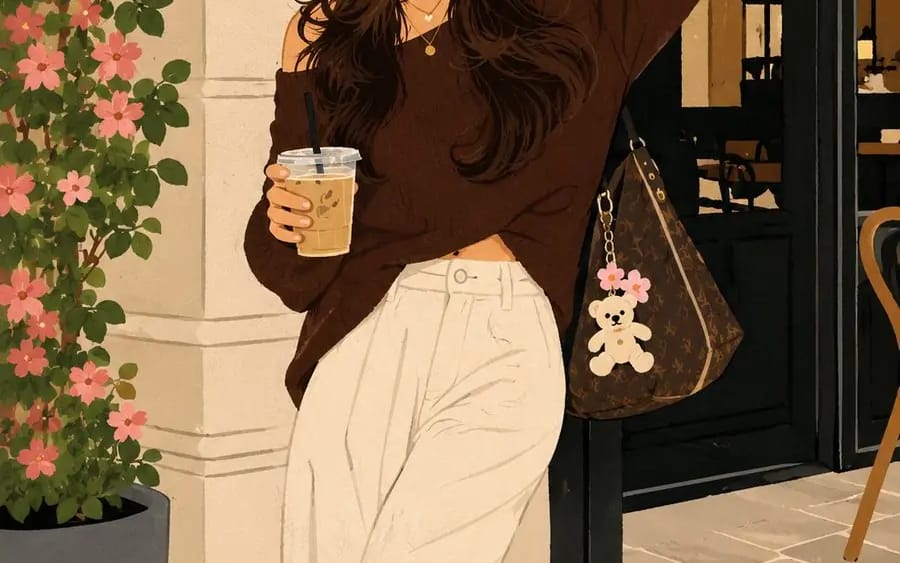
Prompt
MAIN PROMPT
Transform the uploaded image into a premium contemporary naïve illustration while preserving the exact facial identity, facial structure, hairstyle, expression, body proportions, pose, clothing silhouette, composition, and overall scene from the reference image.
FORMAT LOCK
Vertical 3:4 composition. Preserve the original framing, camera angle, perspective, subject placement, and overall composition. Clean centered layout with a premium poster aesthetic.
IDENTITY LOCK
Preserve the exact facial features, hairstyle, expression, body proportions, clothing silhouette, and recognizable identity. Simplify the illustration without changing the person’s appearance.
ILLUSTRATION STYLE
Create a contemporary authorial naïve illustration with a minimalist hand-drawn aesthetic. Use playful proportions, slightly irregular hand-drawn outlines, expressive decorative linework, and intentionally imperfect craftsmanship. Simplify forms while keeping the subject immediately recognizable.
COLOR SYSTEM
Use flat high-contrast color blocks with a refined contemporary palette. No gradients. No shadows. No realistic lighting. No 3D effects. Clean graphic shapes with bold visual balance.
STYLE
Premium designer poster. Editorial illustration. Modern naïve art. Handmade graphic illustration. Museum-quality print design. Minimalist composition. Contemporary art-book aesthetic. Expressive handcrafted character. Ultra-clean premium artwork.
NEGATIVE PROMPT
Avoid photorealism, gradients, shadows, 3D effects, CGI appearance, digital painting, excessive detail, messy linework, blurry edges, distorted anatomy, extra limbs, text, logos, watermarks, or low-quality rendering.
How to use this prompt
- 1Copy the prompt exactly, then paste it into your preferred model or Ideart project.
- 2Replace product, subject, audience, and style details with your own context.
- 3Generate one baseline result first, then remix the strongest direction into a campaign, image set, or video concept.
Explore nearby prompt paths
Model
Build from this prompt
Turn a image prompt into a finished creative project.
Save the prompt, add reference images or notes, and let Ideart shape the next production step from the same creative thread.