
ImageGPT Image
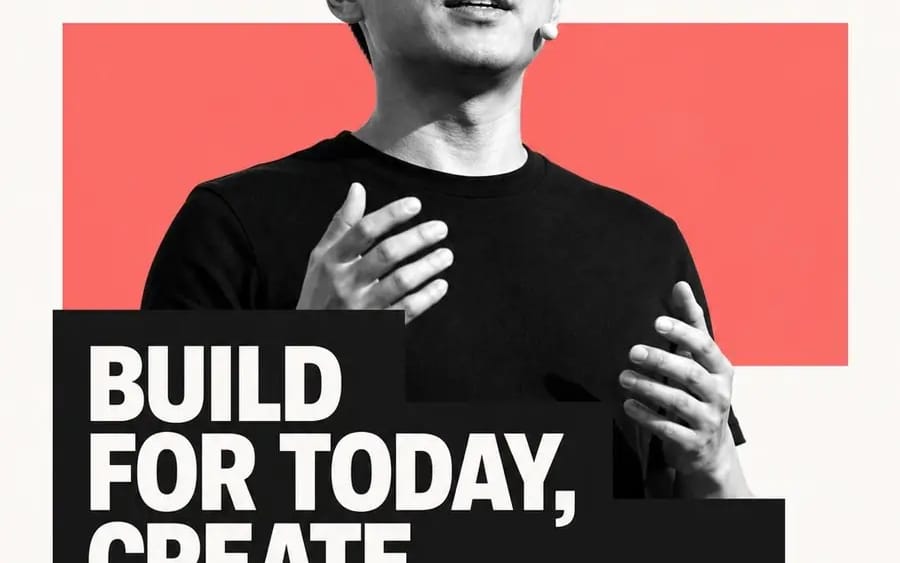
围绕 主题对象 生成一张极简编辑感图文画面
围绕[主题对象]生成一张极简编辑感图文画面:大面积干净留白作为呼吸区,主题核心形体以高反差黑白图像化方式压在视觉中心,边缘抠得利落,局部越过一块主题派生的纯色矩形色场,让主形体与色场形成前后穿插的舞台关系。信息层用一条厚重的深色文字块压住主形体下部,形成图像被文字截断、文字反过来托住图像的第一视觉冲击;主句使用粗重无衬线浅色字,多行紧密排布,字距干净,行距有力,块面向一侧伸出但保持边缘整齐。上方保留一个放大的引号或主题符号作为节奏锚点,下方用极细、轻盈的署名级信息形成强...
Prompt
Generate a minimalist editorial-style graphic centered around [subject object]: a large area of clean white space serves as a breathing zone, with the core subject form depicted in high-contrast black and white at the visual center, sharply cut at the edges. A pure color rectangular field derived from the subject partially overlaps, creating a stage relationship where the main form and color field interweave. The information layer uses a thick dark text block to anchor the lower part of the main form, creating a first visual impact where the image is interrupted by text, and the text supports the image in return; the main sentence uses bold, sans-serif light-colored text, tightly arranged in multiple lines, with clean letter spacing and strong line spacing, extending towards one side while keeping the edges neat. An enlarged quotation mark or thematic symbol is retained at the top as a rhythmic anchor, while extremely thin, lightweight signature-level information forms a strong contrast below, with only a very small identifier at the bottom to conclude. Colors are extracted from the subject's own material, emotion, and cultural signals: the background remains high in brightness, transparent, and clean, while the main form is shaped by black and white light and shadow. The color field uses medium to high saturation of the subject's emotional color, occupying a moderate area of the composition with clear boundaries, and the text block uses clean dark colors to create weight, with a small amount of accent color only on identifiers or details. The overall emotion is bright, direct, and modern, with the energy of a public statement and the order of a publication; avoid complex scenes, decorative textures, dirty old filters, and loose layouts.
How to use this prompt
- 1Copy the prompt exactly, then paste it into your preferred model or Ideart project.
- 2Replace product, subject, audience, and style details with your own context.
- 3Generate one baseline result first, then remix the strongest direction into a campaign, image set, or video concept.
Explore nearby prompt paths
Model
Build from this prompt
Turn a image prompt into a finished creative project.
Save the prompt, add reference images or notes, and let Ideart shape the next production step from the same creative thread.