
ImageGPT Image
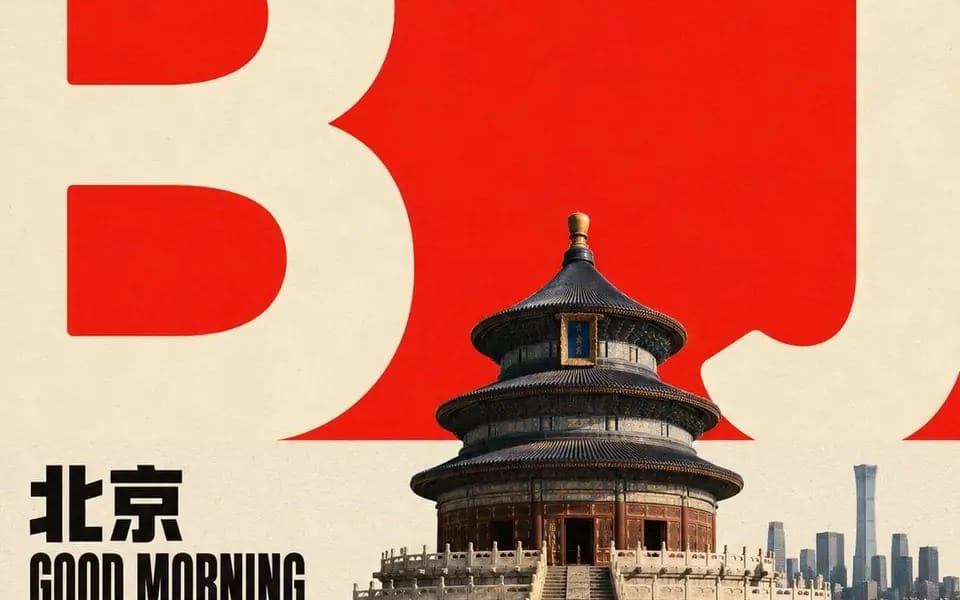
围绕任意主题对象生成具有平面海报秩序与真实焦点形象的设计
围绕任意主题对象生成具有平面海报秩序与真实焦点形象的设计:先以一块占据上部的大面积鲜明高明度色场建立开阔留白,再在下部接入一块近乎等量、低饱和的浅色纸面区域,形成干净明确的水平色域交界;让主题的核心形态被转译成两组超大、低细节、厚重圆润的浅色字符化图形,横跨交界线并向左右边缘出血,保留清晰的内部空腔、粗细对比与被边界裁断的切口,图形不是装饰而是背景中的尺度标尺和视觉骨架。把主题主体或核心对象压缩为中小尺度的具象焦点,放在交界附近,局部遮挡巨型图形,使前景对象、图形轮廓与...
Prompt
Generate designs with a flat poster order and realistic focal imagery around any thematic object: First, establish an open white space with a large area of bright, high-saturation color occupying the upper part, then connect a nearly equal, low-saturation light paper area at the bottom to form a clean and clear horizontal color domain boundary; translate the core shape of the theme into two sets of oversized, low-detail, thick and rounded light-colored character graphics that cross the boundary line and bleed to the left and right edges, retaining clear internal cavities, contrast in thickness, and cut edges defined by the boundary. The graphics are not decoration but serve as a scale ruler and visual skeleton in the background. Compress the main subject or core object into a small to medium-sized concrete focal point placed near the boundary, partially obscuring the giant graphics, creating a clear interplay of foreground objects, graphic outlines, and white space; the focal object is represented with natural photography or highly concrete textures, retaining real surface details, soft side lighting, grounded short and loose shadows, and a neutral dark layer that does not overpower the main subject. Place two lines of short titles related to the theme in the area near the boundary on the left side, using bold, compact, geometrically clear sans-serif uppercase letters, with tight line spacing and neatly left-aligned text blocks, forming small strong anchor points in black or the darkest structural color of the theme; add very small, wide-spaced metadata and numbered short labels on both sides of the upper edge of the giant graphics, creating a sparse editorial design rhythm, but the text only serves order, scale, and information prompts, not replicating fixed copy. The colors are determined by the semantic meaning of the theme regarding hue and material source, but maintain a high-brightness, high-purity main color area in relation to the soft light background's area, brightness, saturation, and emotional tension. The giant graphics use a more eye-catching or neutral light color than the light background, with dark text and focal shadows occupying only a small amount; when the theme's color temperature changes, the large color blocks still maintain contrast, clean boundaries, and limited emphasis colors without averaging out the colors. Overall, it resembles clean flat printing on matte paper, with slightly uniform fibers and particles; the light background and color area exhibit slight density irregularities, the edges of the photographed objects and printed graphic edges are clear but not overly sharp, and the color block boundaries remain neat, avoiding heavy aging, yellowing, dirt, extra decoration, and modern gradients; let the background white space, giant graphics, short titles, micro labels, focal objects, and grounded shadows together form a reading path from the large color area to the text and then to the subject. If the graphic obstruction, color domain boundary, or scale contrast is removed, the image should immediately lose this restrained yet tense design recognition.
How to use this prompt
- 1Copy the prompt exactly, then paste it into your preferred model or Ideart project.
- 2Replace product, subject, audience, and style details with your own context.
- 3Generate one baseline result first, then remix the strongest direction into a campaign, image set, or video concept.
Explore nearby prompt paths
Model
Build from this prompt
Turn a image prompt into a finished creative project.
Save the prompt, add reference images or notes, and let Ideart shape the next production step from the same creative thread.