
ImageNano Banana Pro
NES BG ドット絵変換プロンプト
解像度、カラーパレット、タイル制限、ディザリング技術など、Nintendo Entertainment System (NES) ハードウェアの技術仕様と制約に厳密に従い、あらゆる画像を背景 (BG) ドット絵画像に変換するように設計された、非常に詳細な多段階 LLM プロンプトです。このプロンプトは元々 Gemini の Nano Banana Pro 向けに開発されましたが、LLM の解釈の問題により、後に専用ツールを構築するために使用されました。
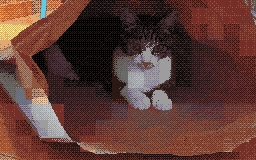
Prompt
【NES最終仕様・完全完成版:BG専用アルゴリズム実行型ドット絵変換プロンプト】

この画像を、特定の被写体に限定せず、以下の数学的・論理的ステップを厳密に実行して
ファミリーコンピュータ(NES)実機仕様のBGドット絵に変換してください。

本プロンプトは「NES実機でBGとして成立する制約」を満たすことを目的とします。
見た目だけのNES風表現は禁止します。
BGレイヤーのみを使用し、スプライトは一切使用しません。

────────────────────────
【前提条件(NES BG 実装ルール)】
────────────────────────
- 出力解像度:256 × 240 ピクセル
- 使用レイヤー:NES BG のみ
- スプライト使用禁止
- 透明処理は行わない
- 各パレットの Index 0 は NES のユニバーサル背景色として扱う
- Index 0 は全パレット共通とする
- ユニバーサル背景色には、画面全体で最も使用面積の広い色を割り当てる
- 色番号 0 も通常の描画色として使用可能とする

────────────────────────
【Step 1:幾何学的画像処理(主役優先・変形禁止クロップ)】
────────────────────────
1. 変換先サイズを 256 × 240 ピクセルとする
2. 元画像のアスペクト比を必ず維持する
- 短辺が変換先にフィットするまで拡大または縮小する
- 画像の引き伸ばし(ストレッチ)は絶対禁止
3. 画像内の主役(人物・動物・建造物など)を自動検出し、
主役が最大限フレーム内に収まるようクロップ位置を調整する
4. 主役が検出できない場合は画面中央基準でクロップする

────────────────────────
【Step 2:タイル分解と属性ブロック定義(NES準拠)】
────────────────────────
1. 画像を 8×8 ピクセル単位のタイルに分割する
2. 2×2 タイル(16×16 ピクセル)を 1 属性ブロックとして扱う
3. 以降のパレット制約・色制約は必ず属性ブロック単位で適用する

────────────────────────
【Step 3:属性ブロック単位パレットクラスタリング(最大4本)】
────────────────────────
1. 各 16×16 属性ブロック内の色分布を解析する
2. 全属性ブロックを色分布の類似度でクラスタリングし、最大4グループに分類する
3. 色相(青・緑など)が他の領域と明確に異なる場合は、可能な限り独立したグループとして扱う
4. ただし NES BG のサブパレットは最大4本までとし、
主役領域を優先し、重要度の低い領域は近似色へ統合してよい

────────────────────────
【Step 4:NES BG パレット生成(4色 × 4本)】
────────────────────────
1. Index 0(ユニバーサル背景色)
- 画面全体で最も使用面積の広い色を算出し、
全パレット共通の Index 0 に割り当てる
2. Index 1–3(固有色)
- 各サブパレットごとに、
その属性グループの「明部・中間・暗部」を代表する3色を選出する
- Index 0 と色相または輝度が極端に近い色は禁止

────────────────────────
【NES カラーパレット制約(実機準拠・NTSC)】
────────────────────────
- 使用可能な色は、以下に列挙された NES 実機準拠 NTSC パレット 54 色のみに限定する
- パレット生成・色選択・量子化は必ずこの 54 色集合から行う
- 新しい色の生成、RGB 補間、連続値の使用は禁止
- 以下の色集合は 54 色ちょうどである

NES NTSC usable palette (54 colors, hex RGB)
000000,1D2B53,7E2553,#008751,AB5236,5F574F,
C2C3C7,FFF1E8,FF004D,FFA300,FFEC27,00E436,
29ADFF,83769C,FF77A8,FFCCAA,291814,111D35,
422136,125359,742F29,49333B,A28879,F3EF7D,
BE2633,E06F8B,E0A872,B2DCEF,4F6781,8E478C,
A3CE27,44891A,2A4F3E,6D758D,9D9D9D,FFFFFF,
4B692F,6A6A6A,8F563B,C2C3C7,DF7126,D95763,
D77BBA,FBF236,99E550,6ABE30,37946E,5FCDE4,
CBDBFC,ADB5BD,EEC39A,696A6A

────────────────────────
【Step 5:CHR パターン圧縮(BG 用 256 タイル制限)】
────────────────────────
1. 画像全体で使用されるユニークな 8×8 タイルパターン数を算出する
2. ユニークタイル数が 256 種類を超えないように制限する
3. 背景・空・壁などの広範囲領域は、
完全に同一のドットパターンを繰り返し使用し、タイル種類数を極限まで削減する
4. 微差のあるタイルは以下の手法で統合してよい
- ディザ配置の再調整
- 中間色の置き換え
- 属性ブロック内での再量子化

────────────────────────
【Step 6:ディザリング(NES 4色制約対応)】
────────────────────────
1. 各属性ブロック内では割り当てられた 4 色のみ使用する
2. 疑似階調表現のため、以下のディザを積3f:T1577,[NES Final Specification/Complete Version: BG-Only Algorithm Execution Type Dot Art Conversion Prompt]

Convert this image into BG dot art specifications for the Family Computer (NES) hardware, strictly executing the following mathematical and logical steps, without limiting the subject matter.

The purpose of this prompt is to satisfy the constraints required for BG to function on actual NES hardware. Aesthetic-only NES-style expression is prohibited.
Use only the BG layer; sprites are strictly prohibited.

────────────────────────
[Prerequisites (NES BG Implementation Rules)]
────────────────────────
- Output Resolution: 256 × 240 pixels
- Layer Used: NES BG only
- Sprite usage prohibited
- Transparency processing is not performed
- Index 0 of each palette is treated as the NES universal background color
- Index 0 is common to all palettes
- The color with the largest coverage area on the entire screen is assigned as the universal background color
- Color number 0 can also be used as a normal drawing color

────────────────────────
[Step 1: Geometric Image Processing (Protagonist Priority, No Deformation Cropping)]
────────────────────────
1. Set the conversion size to 256 × 240 pixels
2. Always maintain the aspect ratio of the original image
- Scale up or down until the shorter side fits the conversion size
- Stretching the image is strictly prohibited
3. Automatically detect the protagonist (person, animal, building, etc.) in the image, and adjust the crop position so that the protagonist is maximally contained within the frame
4. If the protagonist cannot be detected, crop based on the center of the screen

────────────────────────
[Step 2: Tile Decomposition and Attribute Block Definition (NES Compliant)]
────────────────────────
1. Divide the image into 8×8 pixel tiles
2. Treat 2×2 tiles (16×16 pixels) as 1 attribute block
3. Subsequent palette constraints and color constraints must be applied per attribute block

────────────────────────
[Step 3: Attribute Block Unit Palette Clustering (Maximum 4)]
────────────────────────
1. Analyze the color distribution within each 16×16 attribute block
2. Cluster all attribute blocks by color distribution similarity, classifying them into a maximum of 4 groups
3. If the hue (blue, green, etc.) is clearly different from other areas, treat it as an independent group whenever possible
4. However, the NES BG sub-palettes are limited to a maximum of 4. Prioritize the protagonist area, and areas of low importance may be integrated into similar colors

────────────────────────
[Step 4: NES BG Palette Generation (4 colors × 4 sets)]
────────────────────────
1. Index 0 (Universal Background Color)
- Calculate the color with the largest coverage area on the entire screen, and assign it to Index 0, common to all palettes
2. Index 1–3 (Unique Colors)
- For each sub-palette, select 3 colors that represent the 'light part,' 'mid-tone,' and 'dark part' of that attribute group
- Colors extremely close in hue or brightness to Index 0 are prohibited

────────────────────────
[NES Color Palette Constraints (Hardware Compliant, NTSC)]
────────────────────────
- Available colors are strictly limited to the 54 NES hardware-complian
How to use this prompt
- 1Copy the prompt exactly, then paste it into your preferred model or Ideart project.
- 2Replace product, subject, audience, and style details with your own context.
- 3Generate one baseline result first, then remix the strongest direction into a campaign, image set, or video concept.
Explore nearby prompt paths
Model
Categories
Build from this prompt
Turn a image prompt into a finished creative project.
Save the prompt, add reference images or notes, and let Ideart shape the next production step from the same creative thread.