
ImageGPT Image 2
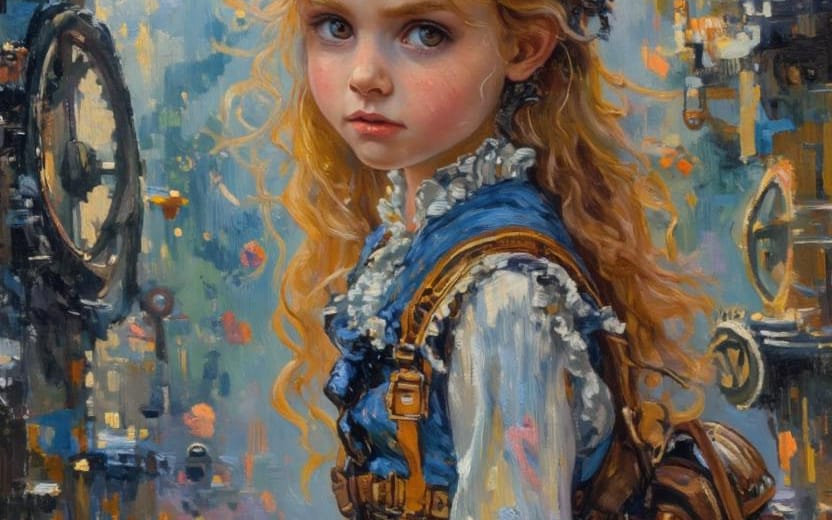
Painterly Steampunk Girl Portrait
This prompt generates a vertical oil-painted steampunk character portrait in a gear-filled workshop, useful for fantasy character art, avatars, or stylized concept illustrations.
Prompt
A painterly steampunk fantasy portrait of a young woman shown from about thigh-up in side profile, facing left, standing in a narrow workshop filled with mechanical parts and clockwork. She has long, voluminous, curly {argument name="hair color" default="golden blonde"} hair cascading down her back, with a few loose strands glowing against the background. A pair of large brass aviator goggles with iridescent blue-purple lenses rests on top of her head. Her outfit is a romantic steampunk dress: a rich {argument name="dress color" default="deep cobalt blue"} bodice and skirt, a high-necked white blouse with ruffled trim and puffed sleeves, layered frills at the collar and hem, and multiple tan leather straps and buckles cinched around the waist and torso. She carries a medium brown leather backpack with rounded flap and visible buckles over one shoulder. The setting is dense with industrial details on both sides: exposed pipes, valves, hanging instruments, circular gauges, and several visible gears, including 1 large gear in the upper right and multiple ring-like metal components along the walls. Use an expressive oil-painting style with thick impasto brushstrokes, soft edges, and a dreamy handcrafted texture. The palette should contrast cool dusty blues and teals in the background with warm brass, copper, amber, and honey highlights on the machinery and hair. The mood is whimsical, adventurous, and slightly nostalgic, like a storybook steampunk inventor’s atelier. Vertical composition, character centered slightly right of frame, background softly abstracted but packed with mechanical forms, no readable text, no modern elements, and keep the face obscured by a simple centered rectangular blur block in a muted tan-brown tone.How to use this prompt
- 1Copy the prompt exactly, then paste it into your preferred model or Ideart project.
- 2Replace product, subject, audience, and style details with your own context.
- 3Generate one baseline result first, then remix the strongest direction into a campaign, image set, or video concept.
Explore nearby prompt paths
Model
Build from this prompt
Turn a image prompt into a finished creative project.
Save the prompt, add reference images or notes, and let Ideart shape the next production step from the same creative thread.