
ImageGPT Image 2
Plush Chibi Soccer Mascot
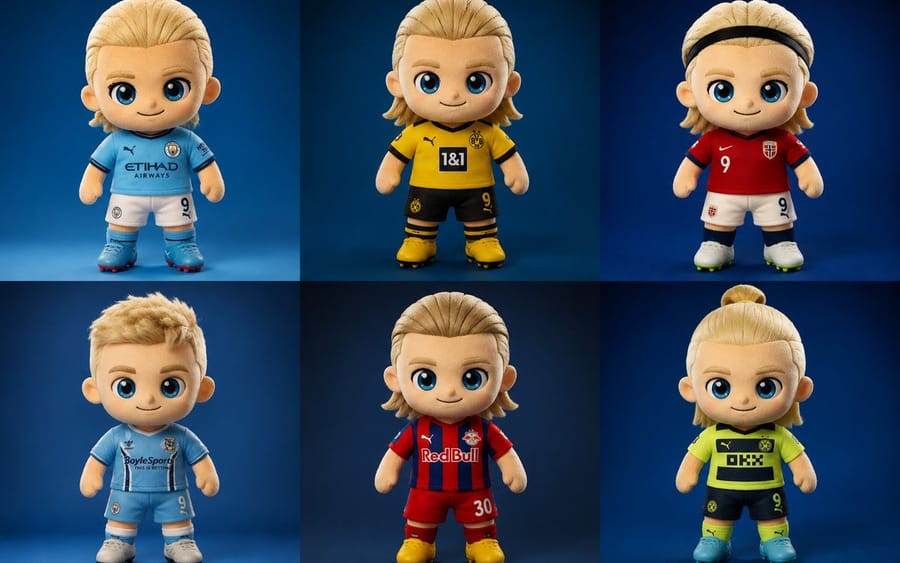
Generates a hyper-realistic collectible plush toy mascot inspired by a soccer player, featuring luxury fabric textures and studio lighting.
Prompt
Create a hyper-realistic collectible plush chibi soccer mascot inspired by a {argument name="subject" default="blond football striker"}, standing front-facing in a premium studio setup with a {argument name="background" default="smooth gradient blue background"}. The character has oversized glossy blue eyes, soft embroidered facial features, a tiny cute smile, rosy cheeks, and highly detailed fluffy fabric texture with visible stitching and luxury plush materials. Stylized proportions with an oversized head and small body, Pixar-style realism, ultra-cute aesthetic.

The mascot wears a modern football jersey with premium embroidered details, alternate jersey designs, unique sponsor patches, jersey number {argument name="number" default="9"}, fitted shorts, long socks, and detailed football boots. Generate multiple outfit variations including sky-blue, black-and-gold, red-and-white, neon yellow, and striped kits. Include different hairstyles such as slicked-back blond hair, messy textured cut, braided top knot, headband style, mullet-inspired cut, and short fluffy hair.

Render as a luxury designer plush toy with cinematic studio lighting, soft shadows, realistic fabric fuzz, ultra-detailed seams, vibrant colors, centered composition, shallow depth of field, photorealistic toy photography, highly detailed embroidery, premium stitching, 8k resolution, Unreal Engine quality, sharp focus, collectible mascot aesthetic, high-end merchandise style.How to use this prompt
- 1Copy the prompt exactly, then paste it into your preferred model or Ideart project.
- 2Replace product, subject, audience, and style details with your own context.
- 3Generate one baseline result first, then remix the strongest direction into a campaign, image set, or video concept.
Explore nearby prompt paths
Model
Build from this prompt
Turn a image prompt into a finished creative project.
Save the prompt, add reference images or notes, and let Ideart shape the next production step from the same creative thread.