
ImageGPT Image 2
Retro PC-88 8-Bit Anime Portrait
Converts portrait photos into authentic late-1980s Japanese PC-88 pixel art using a strict 8-color RGB palette and dithered shading.
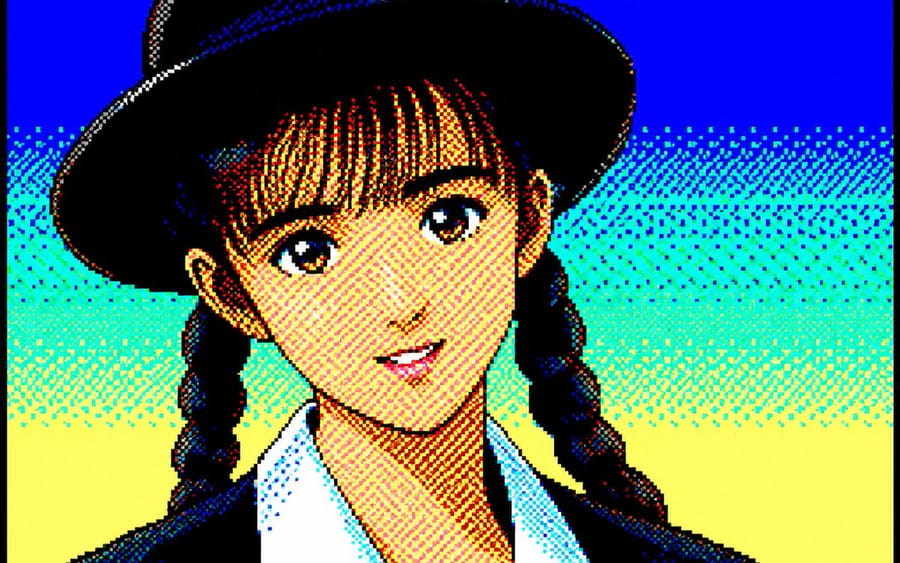
Prompt
Convert the attached portrait photo into anime artwork while preserving recognizability.

Preserve:

- facial proportions
- hairstyle silhouette
- expression
- recognizability
- clothing silhouette

PC-88 RGB rules:

- use only 8-color RGB palette
- black, blue, red, magenta, green, cyan, yellow, white
- no gradients
- no antialiasing
- strong dithering
- checkerboard shading
- 640x200 appearance
- large color blocks
- hard outlines
- slight CRT feeling

Character rendering:

- simplified facial construction
- reduce facial detail lines
- large hair highlight areas
- fewer shading layers
- preserve likeness over redesign

Composition:

- character-focused
- simple supporting background
- empty space around character
- 4:3 feeling

Avoid:

- game UI
- dialogue boxes
- excessive background density
- modern anime rendering

Goal:

Authentic late-1980s Japanese PC88 character artwork while preserving the original person.
How to use this prompt
- 1Copy the prompt exactly, then paste it into your preferred model or Ideart project.
- 2Replace product, subject, audience, and style details with your own context.
- 3Generate one baseline result first, then remix the strongest direction into a campaign, image set, or video concept.
Explore nearby prompt paths
Model
Build from this prompt
Turn a image prompt into a finished creative project.
Save the prompt, add reference images or notes, and let Ideart shape the next production step from the same creative thread.