
ImageGPT Image 2
Software Architecture Visualization Diagram
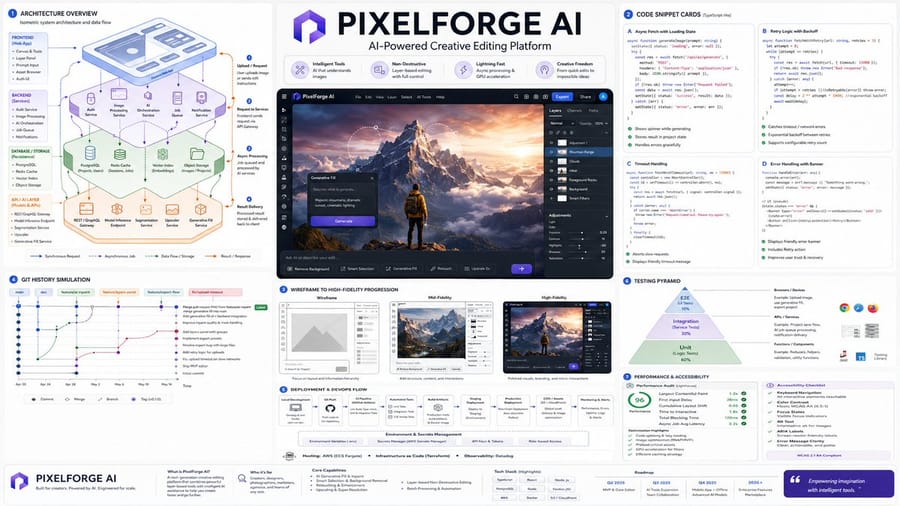
A technical prompt for creating isometric architecture diagrams including frontend, backend, and API layers with annotated code snippets.
Prompt
Do this for an AI powered Photoshop like app: Render_Target = ( Isometric_Architecture_Diagram_Of_{argument name="project name" default="[PROJECT_NAME]"} * 1.7 ) + ( Code_Snippet_Cards_Annotated_With_Async_Fetch_State_And_Error_Handling_For_{argument name="project name" default="[PROJECT_NAME]"} * 1.6 ) + ( Wireframe_To_High_Fidelity_UI_Progression_In_3_Panels_For_{argument name="project name" default="[PROJECT_NAME]"} * 1.5 ) + ( Git_Commit_History_Simulation_With_Branch_Names_And_Feature_Merge_For_{argument name="project name" default="[PROJECT_NAME]"} * 1.3 ) + ( Deployment_Flowchart_Environment_Variables_Hosting_CI/CD_For_{argument name="project name" default="[PROJECT_NAME]"} * 1.4 ) + ( Testing_Pyramid_Visual_Unit_Integration_E2E_With_Example_Snippets_For_{argument name="project name" default="[PROJECT_NAME]"} * 1.2 ) + ( Performance_Audit_Card_And_Accessibility_Checklist_For_{argument name="project name" default="[PROJECT_NAME]"} * 1.0 ) - ( Clichéd_Hacker_Terminal_Green_On_Black_Or_Hoodie_Programmer_Stock_Photos / 3.4 ) - ( Uncommented_Code_Dumps_Without_Layman_Explanation / 3.0 )3How to use this prompt
- 1Copy the prompt exactly, then paste it into your preferred model or Ideart project.
- 2Replace product, subject, audience, and style details with your own context.
- 3Generate one baseline result first, then remix the strongest direction into a campaign, image set, or video concept.
Explore nearby prompt paths
Model
Categories
Build from this prompt
Turn a image prompt into a finished creative project.
Save the prompt, add reference images or notes, and let Ideart shape the next production step from the same creative thread.