
ImageGPT Image 2
VINCO Editorial Moodboard Screenshot
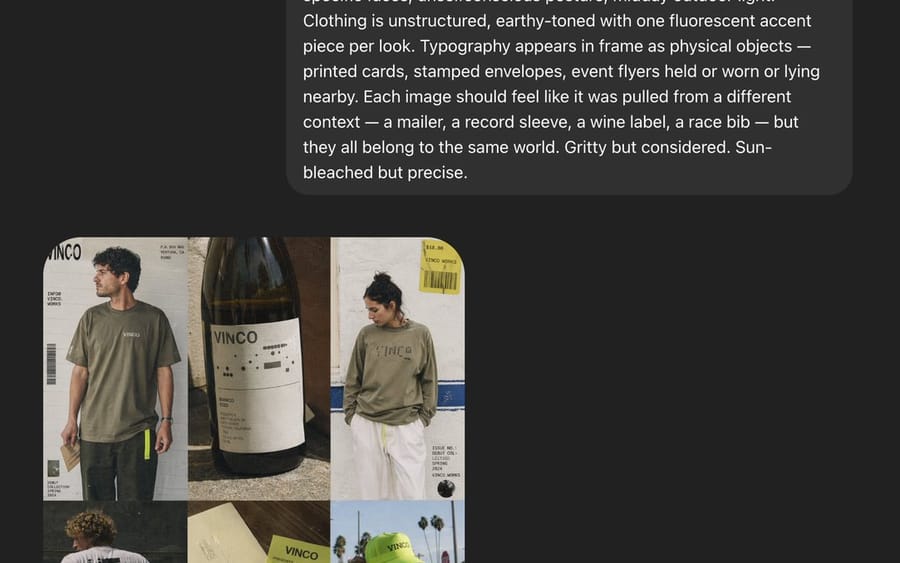
A screenshot-style AI moodboard showing a six-image editorial fashion concept for a fictional streetwear and natural-wine brand, useful for recreating art direction decks or campaign reference boards.
Prompt
Create a 4:5 editorial fashion lookbook moodboard for a fictional brand called {argument name="brand name" default="VINCO"}. The image is a dark-interface screenshot-style composition with a large rounded charcoal text panel across the upper half and a 2-by-3 grid of six fashion/editorial images in the lower left quadrant. The overall aesthetic blends Italian archival graphic design with late-1990s Southern California streetwear, mixing natural wine culture, skate utility, and sun-faded documentary fashion photography. Use gritty but precise art direction, midday outdoor light, slightly chaotic but disciplined typography, and real-person casting rather than polished fashion-model energy. In the top text panel, show a long white sans-serif creative-direction paragraph describing the shoot, with multiple lines of copy, like an AI prompt or design brief displayed inside a rounded dark gray bubble on a near-black background. In the image grid, include exactly 6 tiles: tile 1 shows a young man in an oversized faded olive T-shirt and dark pants standing in front of an off-white poster-like backdrop with bold {argument name="logo text" default="VINCO"} branding, barcode graphics, and small editorial text; tile 2 is a close-up still life of a dark wine bottle with a minimalist white label reading {argument name="bottle label" default="VINCO"}, photographed in warm sunlight with tactile paper texture and shadow; tile 3 shows a person from the back in a washed olive long-sleeve shirt with large subtle chest or back branding, white shorts, and a yellow hanging tag or sticker element near the top right, posed against a pale wall with blue stripe detail and editorial layout text; tile 4 shows a skateboarder crouching or riding away, photographed from behind, wearing a white T-shirt with a large black graphic block on the back and dark shorts, in golden sun on pavement; tile 5 is a printed wine ephemera flat lay with cream paper and a pale chartreuse-green wine label or booklet reading {argument name="product text" default="Vino Naturale"}, featuring grape illustration, small black text, and layered paper pieces; tile 6 shows a person facing camera in a white T-shirt with a race-bib style chest print reading 97, wearing a fluorescent yellow-green cap with small brand text, standing outdoors with palm trees and bright sky behind them. Keep the six images slightly imperfect and collage-like, as if pulled from a campaign deck or saved references. Use earthy tones throughout: olive, cream, charcoal, sun-bleached white, asphalt gray, muted brown, and one fluorescent yellow-green accent repeated in small details. Include visible interface framing around the composition: a dark app-like background, the lower image grid aligned left, and a rounded gray “Edit” button near the bottom left, plus a small circular icon near the bottom right, reinforcing that this is a screenshot of a generated moodboard rather than a clean standalone poster.3c:THow to use this prompt
- 1Copy the prompt exactly, then paste it into your preferred model or Ideart project.
- 2Replace product, subject, audience, and style details with your own context.
- 3Generate one baseline result first, then remix the strongest direction into a campaign, image set, or video concept.
Explore nearby prompt paths
Model
Build from this prompt
Turn a image prompt into a finished creative project.
Save the prompt, add reference images or notes, and let Ideart shape the next production step from the same creative thread.