
ImageAI
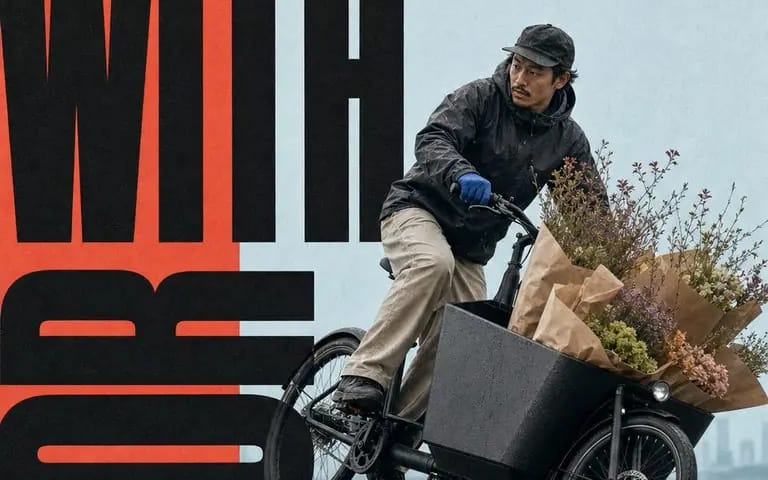
Coral window megatype motion poster
{ "style": "coral-window-megatype-motion-poster", "aspect_ratio": "4:5", "style_rules": [ "warm coral-red matte paper field #EE554B dominates ~2/3 of the canvas as both border and ground", "one large hard-edged pale powder-blue...
Prompt
{
  "style": "coral-window-megatype-motion-poster",
  "aspect_ratio": "4:5",
  "style_rules": [
    "warm coral-red matte paper field #EE554B dominates ~2/3 of the canvas as both border and ground",
    "one large hard-edged pale powder-blue photographic window #B9D6DF sits off-center, no frame stroke",
    "a single realistic full-body subject frozen at a decisive moment of motion, isolated in the quiet window",
    "colossal near-black #171717 ultra-heavy condensed sans words run in opposing horizontal and vertical directions, exceed the canvas, cropped at the edges",
    "the body crosses over some letterforms and behind others — deliberate occlusion stitches photo and type into one space",
    "tiny black editorial labels sit sparsely near the outer margins, often rotated 90 degrees",
    "one chunky geometric direction arrow anchors an otherwise open corner",
    "soft natural daylight, believable skin and fabric detail; uncoated paper grain and subtle ink absorption unify photo and type — no cinematic effects",
    "palette stays coral / powder blue / near-black with at most one restrained extra accent"
  ],
  "MAIN_TEXT": "[Main Text]",
  "SUBJECT": "[Subject]",
  "SUBJECT_ACTION": "[Subject Action]",
  "LABEL_TEXT": "[Label Text]",
  "DIRECTION_SYMBOL": "[Direction Symbol]"
}How to use this prompt
- 1Copy the prompt exactly, then paste it into your preferred model or Ideart project.
- 2Replace product, subject, audience, and style details with your own context.
- 3Generate one baseline result first, then remix the strongest direction into a campaign, image set, or video concept.
Explore nearby prompt paths
Model
Build from this prompt
Turn a image prompt into a finished creative project.
Save the prompt, add reference images or notes, and let Ideart shape the next production step from the same creative thread.