
ImageAI
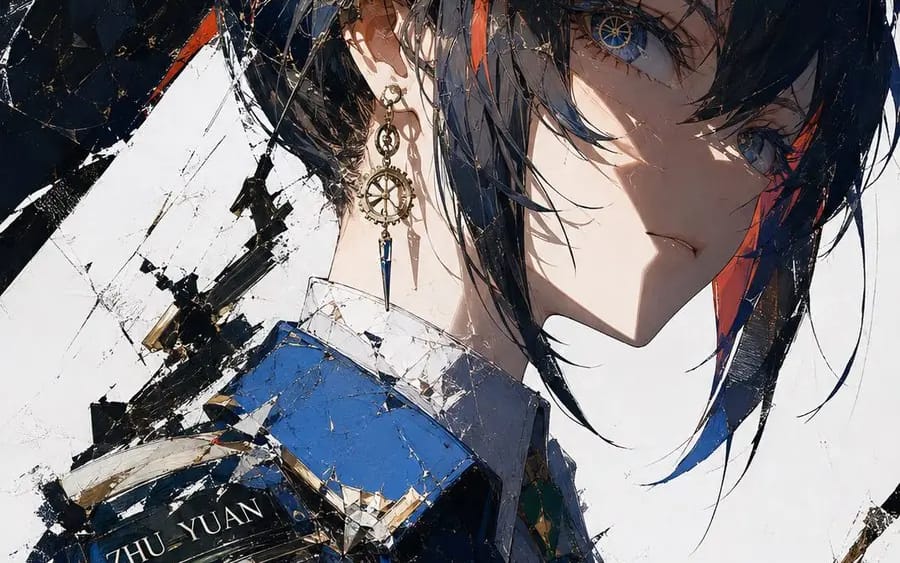
断刃时械刮刀风
{ "style_name": "断刃时械刮刀风", "medium": "数字刮刀油画、厚涂插画", "composition": "局部特写,撕裂笔刷裁切边缘,对角线构图,大面积留白", "lighting": "硬质侧逆光,锐利明暗交界,高对比度光影", "color_grading": "钴蓝+鎏金双色高对比,暖肤色过渡,纯白基底,低杂色", "texture": "刮刀堆叠笔触肌理,硬质油画质感,金属高光锐利", "visual_keywords":...
Prompt
{ "style_name": "Broken Blade Mechanical Palette Knife Wind",
  "medium": "Digital Palette Knife Oil Painting, Thick Brush Illustration",
  "composition": "Close-up, torn brush cutting edges, diagonal composition, large areas of white space",
  "lighting": "Hard side backlight, sharp light and dark boundaries, high contrast light and shadow",
  "color_grading": "Cobalt Blue + Gold Two-color High Contrast, Warm Skin Tone Transition, Pure White Base, Low Noise",
  "texture": "Palette knife stacked brush texture, hard oil painting quality, sharp metallic highlights",
  "visual_keywords": "Steampunk, Clockwork Pupil, Gear Accessories, Broken Aesthetics, Anime Cold Feel Illustration",
  "constraints": "Clean image, no excess impurities, precise structure, unified and strong brushstrokes, restrained effects",
  "output_specs": "8K HD, Illustration Precision, Complete Layered Texture"
}

n=10, character=[Character Name]How to use this prompt
- 1Copy the prompt exactly, then paste it into your preferred model or Ideart project.
- 2Replace product, subject, audience, and style details with your own context.
- 3Generate one baseline result first, then remix the strongest direction into a campaign, image set, or video concept.
Build from this prompt
Turn a image prompt into a finished creative project.
Save the prompt, add reference images or notes, and let Ideart shape the next production step from the same creative thread.