
ImageGPT Image 2
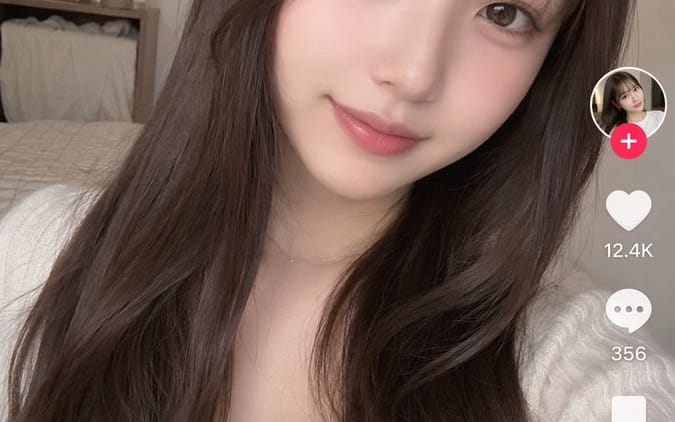
TikTok-Style Video Interface Mockup
Generates a realistic short-form video app interface overlaying a customizable selfie or portrait.
Prompt
{
  "type": "short-form video app interface mockup",
  "background_image": {
    "subject": "{argument name=\"subject description\" default=\"young Japanese woman with long wavy dark brown hair and see-through bangs, wearing a white ribbed top, soft natural makeup, smiling gently at the camera\"}",
    "setting": "cozy bedroom with a bed, wooden shelf, and dried flowers in the background, soft natural lighting, selfie angle"
  },
  "ui_overlay": {
    "top_bar": {
      "left": "LIVE icon",
      "center": "フォロー中 | {argument name=\"active tab\" default=\"おすすめ\"}",
      "right": "Search icon"
    },
    "right_sidebar": {
      "count": 6,
      "elements": [
        "Profile picture with pink plus badge",
        "Heart icon with {argument name=\"like count\" default=\"12.4K\"}",
        "Speech bubble icon with 356",
        "Bookmark icon with 1,289",
        "Share arrow icon with 204",
        "Spinning vinyl record icon"
      ]
    },
    "bottom_left_caption": {
      "username": "{argument name=\"username\" default=\"@ゆい | 日常をちょっとだけ♡\"}",
      "description": "{argument name=\"caption text\" default=\"今日も見てくれてありがとう☺️ みんなにとって良い一日になりますように🕊️\"}",
      "audio_track": "🎵 オリジナル楽曲 - ゆい"
    },
    "bottom_navigation": {
      "count": 5,
      "labels": [
        "レコメンド",
        "友達",
        "Create button",
        "メッセージ",
        "プロフィール"
      ]
    }
  }
}3c:T618,{
  "type": "short-form video app interface mockup",
  "background_image": {
"subject": "{argument name=\"subject description\" default=\"young Japanese womanHow to use this prompt
- 1Copy the prompt exactly, then paste it into your preferred model or Ideart project.
- 2Replace product, subject, audience, and style details with your own context.
- 3Generate one baseline result first, then remix the strongest direction into a campaign, image set, or video concept.
Explore nearby prompt paths
Model
Build from this prompt
Turn a image prompt into a finished creative project.
Save the prompt, add reference images or notes, and let Ideart shape the next production step from the same creative thread.