
ImageGPT Image 2
Travel Ad Conversion Comparison Slide
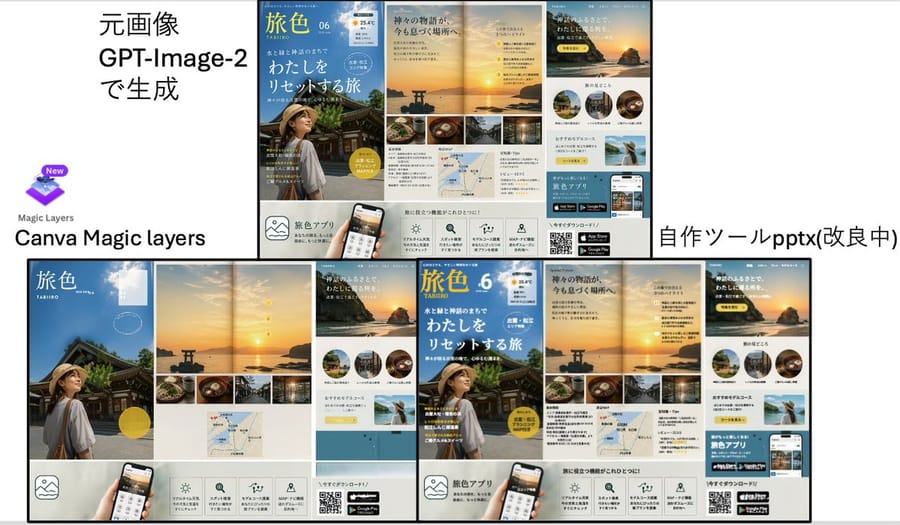
A Japanese presentation-style comparison slide showing a GPT-Image-2-generated travel brochure ad versus Canva Magic Layers and a custom PPTX conversion tool, useful for demos of editable layer reconstruction.
Prompt
{"type":"comparison presentation slide with two large poster-layout travel advertisements","style":"clean Japanese business presentation, white background, black divider lines, screenshot-like composite layout","canvas":{"aspect_ratio":"16:9","background":"white"},"layout":{"sections":[{"title":"left comparison area","position":"top-left and bottom-left","count":3,"labels":["元画像 GPT-Image-2で生成","Canva Magic layers","Magic Layers"]},{"title":"right comparison area","position":"top-right and bottom-right","count":2,"labels":["自作ツールpptx(改良中)"]}],"dividers":"one thick vertical divider near center and one thick horizontal divider across the middle, with thin black borders around the ad boards","composition":"top row shows source on the left and converted output on the right; bottom row shows enlarged reconstructed layouts side by side"},"text_elements":{"top_left_heading":"元画像 GPT-Image-2で生成","bottom_left_brand":"Canva Magic layers","bottom_right_label":"自作ツールpptx(改良中)"},"embedded_ad_design":{"type":"Japanese travel magazine / tourism app promotional brochure","count":4,"brand_name":"旅色","issue":"06","subtitle":"TABIIRO","theme":"sunset coastal shrine trip in Japan","color_palette":["sky blue","sunset gold","warm beige","white","black"],"main_pages":4,"page_descriptions":["cover page with blue sky background, traditional shrine building, and a woman in a straw hat seen from behind in the lower left, large white Japanese headline text, yellow circular badge, and small weather-style icon at the top right","double-page sunset spread with a torii gate in the water, glowing sun near the horizon, a vertical sequence of 4 small yellow numbered markers, and a bottom strip of 4 rectangular food and travel photos","page featuring a large sunset cliff image with Japanese copy, 3 circular destination thumbnails in a row, a pale yellow recommendation box, and a small scenic photo of a woman raising her arms by the sea","bottom information strip with 5 square feature icons, a smartphone mockup held by a hand, a QR code, and 2 app store badges"]},"visual_details":{"canva_logo":{"present":true,"position":"left center","description":"purple layered square icon with a small New badge above, and the words Magic Layers below"},"reconstruction_difference":"the right-side output arranges the same ad components as separated editable blocks with tighter alignment and visible modularity","ad_components_count":{"circular_thumbnails":3,"bottom_feature_icons":5,"app_store_badges":2,"qr_codes":1,"small_bottom_strip_photos":4}},"rendering":"flat presentation screenshot, crisp typography, high-resolution UI/document mockup aesthetic"}3d:Ta92,{"type":"comparison presentation slide with two largHow to use this prompt
- 1Copy the prompt exactly, then paste it into your preferred model or Ideart project.
- 2Replace product, subject, audience, and style details with your own context.
- 3Generate one baseline result first, then remix the strongest direction into a campaign, image set, or video concept.
Explore nearby prompt paths
Model
Categories
Build from this prompt
Turn a image prompt into a finished creative project.
Save the prompt, add reference images or notes, and let Ideart shape the next production step from the same creative thread.