
ImageNano Banana Pro
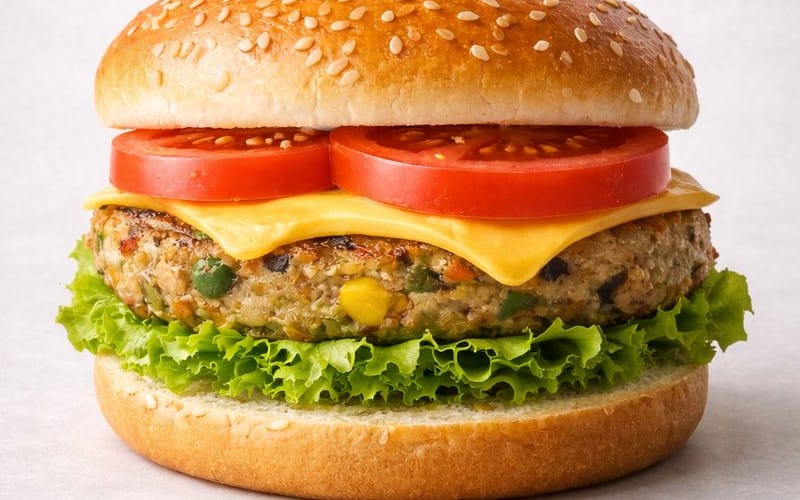
Ultra-realistic Commercial Veg Burger Photography and Exploded View
A dual-prompt entry for food photography. The first prompt generates an ultra-realistic, perfectly stacked commercial image of a vegetarian burger. The second prompt generates an exploded, infographic-style view of the burger's five ingredients, complete with specific weights, designed for commercial recipe breakdown. It also includes a motion prompt for a video of the burger spinning and separating.
Prompt
Motion Prompt: The burger start to round spin while ingredients separate gently and precisely, maintaining alignment and scale. The motion is smooth, with no extra effects.

IMAGE 1 - Ultra-realistic studio food photography of a freshly prepared {argument name="burger type" default="vegetarian"} burger, centered in frame. A soft sesame seed bun on top, layered with ripe red tomato slices, melted cheddar cheese, a thick grilled veg patty with visible vegetables (corn, peas, carrots), crisp green lettuce, and a soft bottom bun. Perfectly stacked and symmetrical. Neutral light grey studio background with subtle texture, soft diffused lighting, gentle shadows beneath the burger, high sharpness and natural colors. Premium fast-food commercial style, realistic textures, glossy highlights on cheese and bun, shallow depth of field, ultra-high resolution, clean composition, no text, no labels, no hands, no props, no watermark.

IMAGE 2 - Exploded view of the same veg burger, presented as a clean, commercial recipe-style breakdown.
Exactly five ingredients, separated and arranged vertically from top to bottom, evenly spaced and perfectly aligned.
Ingredient order (top → bottom):
Fresh tomato slices — 30 g
Cheddar cheese slice — 25 g
Grilled veg patty — 90 g
Crisp lettuce — 20 g
Soft sesame burger bun — 80 g (bottom base)
Add clear infographic-style annotations for each ingredient with exact weights.
Minimal, instructional, commercial style on a light neutral background.42:T5d8,MotiHow to use this prompt
- 1Copy the prompt exactly, then paste it into your preferred model or Ideart project.
- 2Replace product, subject, audience, and style details with your own context.
- 3Generate one baseline result first, then remix the strongest direction into a campaign, image set, or video concept.
Explore nearby prompt paths
Model
Build from this prompt
Turn a image prompt into a finished creative project.
Save the prompt, add reference images or notes, and let Ideart shape the next production step from the same creative thread.