
ImageNano Banana Pro
Urban Street Portrait with Baggy Pants Prompt
A highly detailed structured prompt for generating a vertical, mid-length street fashion portrait of a woman in a beige striped tank top and cream baggy pants, set against a historic city street background during the late morning. The prompt specifies composition, lighting, and aesthetic details for a casual elegance look.
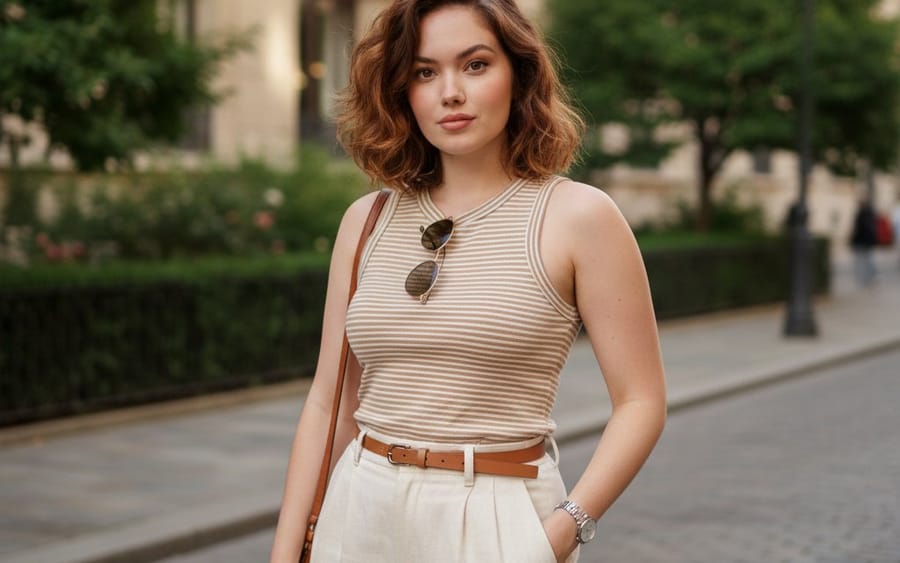
Prompt
{ "scene_type": "outdoor urban street portrait", "composition": { "framing": "vertical portrait orientation", "shot_type": "mid-length shot from head to mid-thigh", "camera_angle": "eye-level", "subject_position": "centered with slight rightward offset", "leading_lines": "sidewalk and building facade create linear depth", "depth_of_field": "moderate depth, background softly detailed but not blurred", "balance": "subject balanced against architectural mass on left and greenery on right" }, "subject": { "gender_presentation": "female-presenting", "pose": "relaxed standing pose, one hand in pocket, one arm relaxed", "expression": "neutral to confident with subtle smile", "gaze": "looking directly at camera", "hair": { "style": "long, loose waves", "part": "side-parted", "color": "dark brown with warm undertones", "texture": "soft, voluminous" }, "accessories": [ "round metal-frame sunglasses with dark lenses", "small hoop earrings", "wristwatch with metallic band", "brown leather shoulder bag" ] }, "clothing": { "top": { "type": "sleeveless fitted tank top", "color": "{argument name="top color" default="warm beige"}", "pattern": "thin horizontal white stripes", "fit": "form-fitting" }, "bottom": { "type": "baggy pant", "color": "off-white / cream", "fabric_appearance": "structured cotton or linen blend" }, "belt": { "color": "light brown", "buckle": "gold-toned minimalist buckle" } }, "environment": { "location_type": "historic city street", "architecture": { "style": "classical or colonial stone facade", "features": "arched windows, ornate stone detailing, balconies" }, "natural_elements": "trees and shrubs lining the sidewalk", "ground": "concrete sidewalk with adjacent landscaped soil area", "background_activity": "parked cars partially visible, quiet street ambiance" }, "lighting": { "source": "natural sunlight", "time_of_day": "late morning or afternoon", "quality": "soft directional light", "shadows": "gentle shadows cast by trees and buildings", "skin_tone_rendering": "warm and even" }, "color_palette": { "dominant_colors": ["beige", "cream", "brown", "stone gray", "green"], "overall_tone": "warm, natural, lifestyle aesthetic", "contrast": "moderate contrast between subject and background" }, "camera_characteristics": { "lens_look": "standard to short telephoto perspective", "distortion": "minimal distortion", "sharpness": "sharp focus on subject with clear texture detail", "noise": "low noise, clean image" }, "artistic_style": { "genre": "fashion lifestyle photography", "mood": "casual elegance, confident, relaxed", "styling_influence": "modern minimalist with classic elements", "social_media_aesthetic": "Instagram-style street fashion portrait" }, "post_processing": { "color_grading": "warm tones with natural saturation", "contrast_adjustment": "slightly enhanced", "retouching": "minimal, natural skin texture preserved", "overall_finish": "clean and polished" }, "typography": { "present": false } }How to use this prompt
- 1Copy the prompt exactly, then paste it into your preferred model or Ideart project.
- 2Replace product, subject, audience, and style details with your own context.
- 3Generate one baseline result first, then remix the strongest direction into a campaign, image set, or video concept.
Explore nearby prompt paths
Model
Build from this prompt
Turn a image prompt into a finished creative project.
Save the prompt, add reference images or notes, and let Ideart shape the next production step from the same creative thread.