
ImageGPT Image 2
Victorian Maid Tea Room Anime
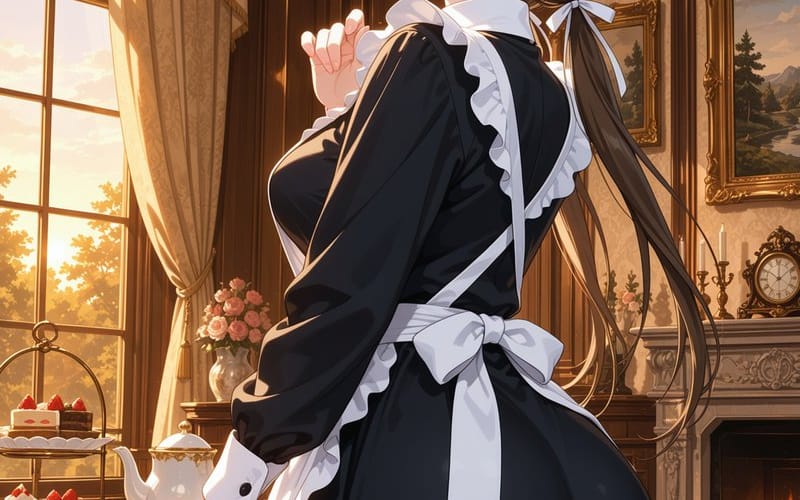
A detailed text-to-image prompt for creating an elegant anime Victorian maid scene in a warm aristocratic tea room.
Prompt
Create a polished anime-style vertical illustration of {argument name="character name" default="a young Victorian maid"} standing in a luxurious late-19th-century manor tea room at golden hour. The character is shown from the hips up to full body, turned three-quarters away from the viewer with her back and side profile visible, elegant and slightly coy posture, one hand raised delicately near her chest and the other resting by a teacup on a wooden tea table. She wears a classic black Victorian maid dress with long sleeves, glossy fabric folds, white cuffs, white collar, white ruffled apron trim running down the front and shoulders, a large white bow tied at the back of the waist, and a white maid headband. Give her {argument name="hair color" default="dark brown"} hair in a long low ponytail with braided side sections, tied with a white ribbon, flowing strands catching the sunlight. Obscure the face with a smooth square censor block centered over the face, softly blurred in warm skin tones, with no facial features visible. The room is richly detailed: dark carved wood paneling, ornate wallpaper, crown molding, a glowing brass chandelier with candle bulbs and crystal drops above, a large tall window on the left with cream draped curtains and tassels, sunset light streaming in, a wooden tea table holding a tiered dessert stand with strawberry cakes, a white teapot, a teacup and saucer, and small pastries. In the background include a marble fireplace with a warm fire, mantel decor, candles, a vintage clock, framed landscape paintings in ornate gold frames, a vase of pink roses, and a red upholstered chair with patterned pillows. Use warm amber lighting, soft rim light on the maid, refined romantic atmosphere, high-detail anime rendering, clean linework, painterly background, vertical composition, no visible text, no watermark, no extra characters.How to use this prompt
- 1Copy the prompt exactly, then paste it into your preferred model or Ideart project.
- 2Replace product, subject, audience, and style details with your own context.
- 3Generate one baseline result first, then remix the strongest direction into a campaign, image set, or video concept.
Explore nearby prompt paths
Model
Build from this prompt
Turn a image prompt into a finished creative project.
Save the prompt, add reference images or notes, and let Ideart shape the next production step from the same creative thread.