
ImageNano Banana Pro
Vintage 2000s Disposable Camera Style Template
A structured JSON template designed to generate images with a specific vintage analog aesthetic, mimicking a 2000s disposable camera. It includes fields for defining the subject, environment, lighting (hard on-camera flash), film stock emulation (Kodak Tri-X 400), and negative constraints to ensure a film-like result with imperfections like grain and light leaks.
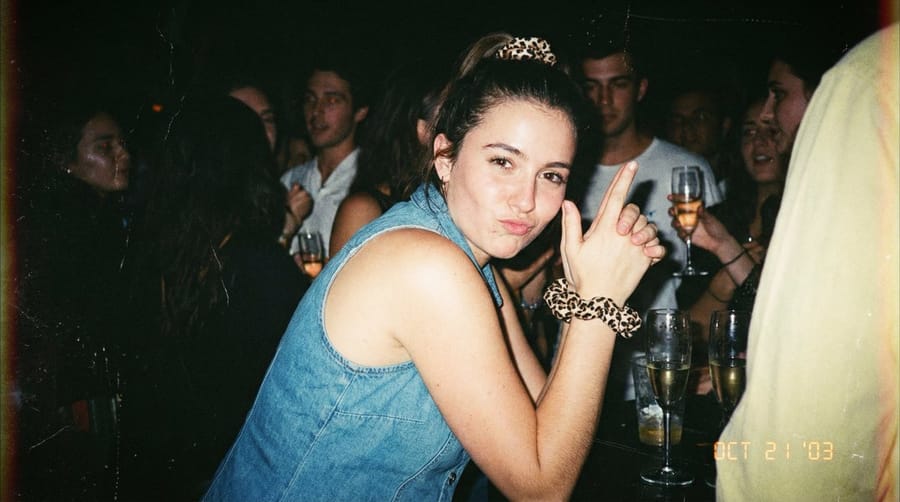
Prompt
{
  "meta": {
    "purpose": "Vintage analog photography style for nostalgic portraits or scenes",
    "style": "2000s disposable camera vibe with grain and imperfections, 8K but film-like"
  },
  "reference_image": {
    "use": true,
    "extraction": "emulate film stock, grain, lighting from upload"
  },
  "subject": {
    "description": "{argument name=\"subject description\" default=\"[e.g., Young woman in retro outfit OR Group candid shot]\"}",
    "expression": "{argument name=\"subject expression\" default=\"[e.g., Playful laugh, winking]\"}",
    "pose": "[e.g., Leaning forward, finger gun]",
    "attire": "[e.g., Sleeveless top, leopard accessories]"
  },
  "environment": {
    "setting": "{argument name=\"setting\" default=\"[e.g., Dimly lit party OR Urban street at night]\"}",
    "details": "[e.g., Champagne glasses, blurred crowd]"
  },
  "lighting": {
    "type": "[e.g., Hard on-camera flash]",
    "effects": "high contrast, light leaks, chromatic aberration"
  },
  "art_style": {
    "film_stock": "[e.g., Kodak Tri-X 400 pushed, chunky grain]",
    "mood": "candid nightlife",
    "imperfections": "vignette, scratches"
  },
  "render_quality": {
    "detail_level": "hyper-detailed skin",
    "sharpness": "slight softness for analog"
  },
  "constraints": {
    "no_digital_clean": true
  },
  "negative_prompt": ["soft lighting", "perfect symmetry", "over-edited", "cartoon"]
}How to use this prompt
- 1Copy the prompt exactly, then paste it into your preferred model or Ideart project.
- 2Replace product, subject, audience, and style details with your own context.
- 3Generate one baseline result first, then remix the strongest direction into a campaign, image set, or video concept.
Explore nearby prompt paths
Model
Categories
Build from this prompt
Turn a image prompt into a finished creative project.
Save the prompt, add reference images or notes, and let Ideart shape the next production step from the same creative thread.