
ImageNano Banana Pro
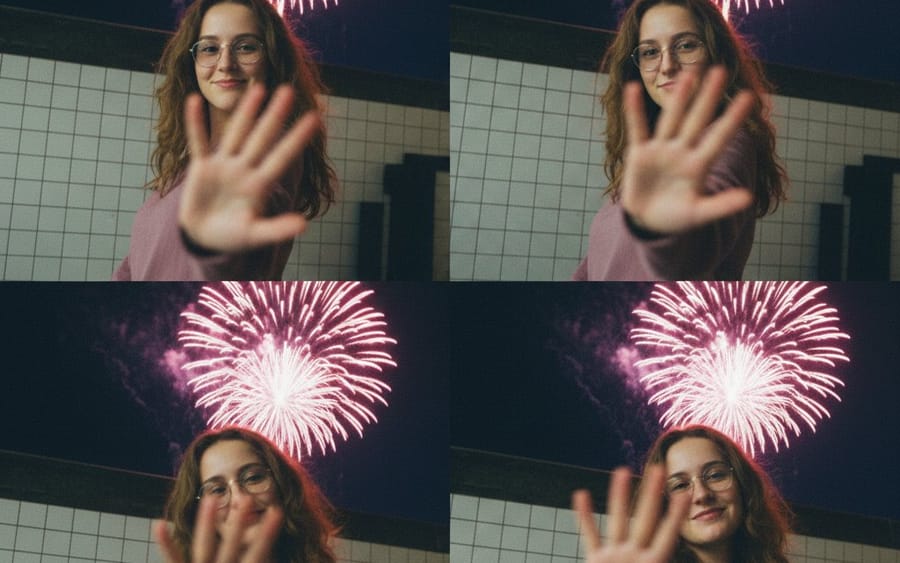
Vintage Digicam Quad-Split Collage with Motion Blur
A structured JSON prompt for generating a 4-panel grid collage using a vintage digital camera aesthetic (2000s digicam style). It features a young woman in a nighttime city setting with fireworks, emphasizing heavy motion blur and intentional lens blur on a foreground hand.
Prompt
{
  "subject": {
    "description": "A young woman with wavy brown hair wearing glasses and a mauve long-sleeve top.",
    "actions": [
      "turning her head quickly",
      "holding a hand up to the camera lens",
      "smiling warmly at the viewer"
    ]
  },
  "composition": {
    "layout": "4-panel grid, quad-split collage",
    "background": "Nighttime city street next to a white tiled wall with large pink and white fireworks exploding in the dark sky.",
    "framing": "Medium shot, candid sequence"
  },
  "style": {
    "photography_type": "Vintage digital camera aesthetic, 2000s digicam style",
    "lighting": "Low-light street photography, soft flash, natural glow from fireworks",
    "visual_effects": [
      "heavy motion blur",
      "shallow depth of field",
      "slight film grain",
      "intentional lens blur on the hand"
    ],
    "color_palette": "Muted {argument name="top color" default="mauve"}, deep night blues, warm skin tones, bright pink pops"
  },
  "mood": "Nostalgic, cinematic, spontaneous, youthful"
}How to use this prompt
- 1Copy the prompt exactly, then paste it into your preferred model or Ideart project.
- 2Replace product, subject, audience, and style details with your own context.
- 3Generate one baseline result first, then remix the strongest direction into a campaign, image set, or video concept.
Explore nearby prompt paths
Model
Build from this prompt
Turn a image prompt into a finished creative project.
Save the prompt, add reference images or notes, and let Ideart shape the next production step from the same creative thread.