
ImageGPT Image 2
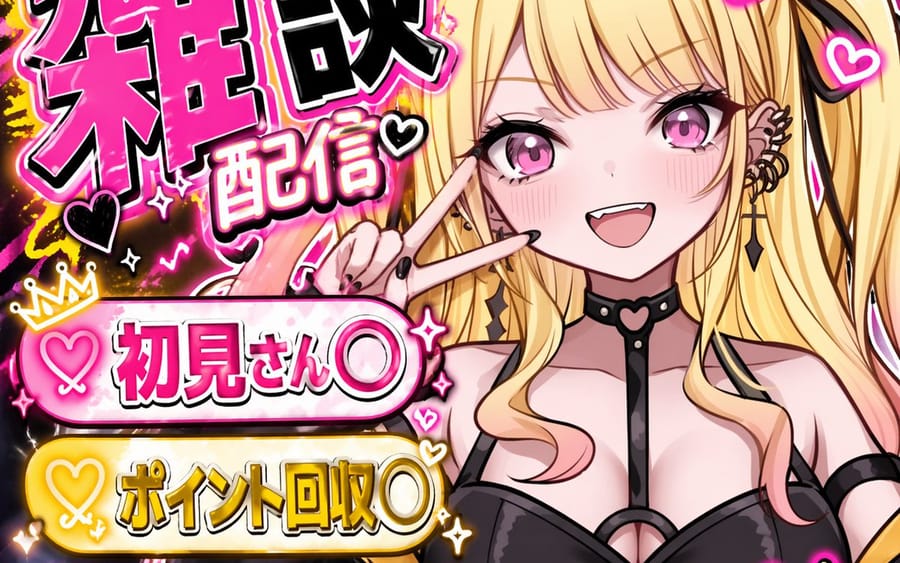
VTuber Chat Stream Thumbnail
Generates a vibrant, text-heavy anime-style thumbnail for a VTuber chat stream, featuring customizable banners and titles.
Prompt
{
  "type": "VTuber stream thumbnail",
  "character": {
    "hair": "long blonde twin tails with pink gradient ends",
    "eyes": "large pink anime eyes",
    "expression": "cheerful smile with a small fang, making a peace sign near the eye",
    "outfit": "black top with harness straps, black heart-ring choker, multiple ear piercings including a cross dangle, black nail polish"
  },
  "background": "vibrant neon pink and black leopard print with glowing yellow accents, sparkles, and floating hearts",
  "typography_and_layout": {
    "main_title": {
      "position": "top left",
      "style": "large, bold, 3D, pink and black with white outlines",
      "text": "{argument name=\"main title\" default=\"雑談配信\"}"
    },
    "top_right_text": {
      "style": "casual handwritten style with a heart",
      "text": "{argument name=\"top right text\" default=\"まったり話そ〜♡\"}"
    },
    "bottom_left_banners": {
      "count": 3,
      "style": "glowing pill-shaped banners with heart icons on the left",
      "colors": ["pink", "yellow", "purple"],
      "labels": [
        "{argument name=\"banner 1 text\" default=\"初見さん〇\"}",
        "{argument name=\"banner 2 text\" default=\"ポイント回収〇\"}",
        "{argument name=\"banner 3 text\" default=\"ROM〇\"}"
      ]
    },
    "bottom_right_text": {
      "style": "casual handwritten style with a heart, yellow text with pink outline",
      "text": "気軽にコメントしてねっ♡"
    }
  }
}34:T5e0,{
  "type": "VTuber stream thumbnail",
  "character": {
"hair"How to use this prompt
- 1Copy the prompt exactly, then paste it into your preferred model or Ideart project.
- 2Replace product, subject, audience, and style details with your own context.
- 3Generate one baseline result first, then remix the strongest direction into a campaign, image set, or video concept.
Explore nearby prompt paths
Model
Build from this prompt
Turn a image prompt into a finished creative project.
Save the prompt, add reference images or notes, and let Ideart shape the next production step from the same creative thread.