
ImageGPT Image 2
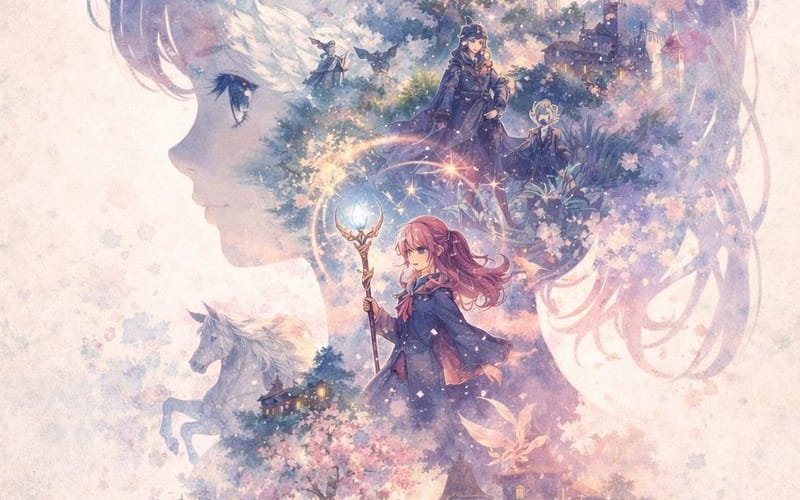
Watercolor Double-Exposure Fantasy Silhouette
Generates a dreamy watercolor illustration featuring a character's profile silhouette filled with a detailed, layered fantasy scene.
Prompt
A dreamy watercolor double-exposure illustration where the main shape is the side profile silhouette of a {argument name="main subject silhouette" default="young anime girl facing left"}. Inside her silhouette is a rich, layered fantasy world. At the top is a {argument name="top scenery" default="grand white castle with multiple spires under a starry night sky with a crescent moon"}. Below the castle, two cloaked figures stand in a mystical forest. In the center, a {argument name="central character" default="young female mage with pink hair holding a glowing magical staff"} stands prominently. To the left of the mage, a white horse is visible. At the bottom of the silhouette is a {argument name="bottom scenery" default="fantasy village surrounded by blooming cherry blossom trees, with a large open spellbook and a sword resting in the foreground"}. The artwork features a {argument name="color palette" default="soft pastel purples, pinks, and blues"} color palette. The background outside the silhouette is textured parchment with soft watercolor splatters and fading cherry blossom petals, with the signature "tamanyo" written in cursive at the bottom left.How to use this prompt
- 1Copy the prompt exactly, then paste it into your preferred model or Ideart project.
- 2Replace product, subject, audience, and style details with your own context.
- 3Generate one baseline result first, then remix the strongest direction into a campaign, image set, or video concept.
Explore nearby prompt paths
Model
Categories
Build from this prompt
Turn a image prompt into a finished creative project.
Save the prompt, add reference images or notes, and let Ideart shape the next production step from the same creative thread.