
ImageGPT Image 2
Extreme Weather TV Reporter System
A comprehensive instruction set for GPT Image 2 to generate fictional weather reporters during extreme events like typhoons or heatwaves while maintaining character consistency from a reference image.
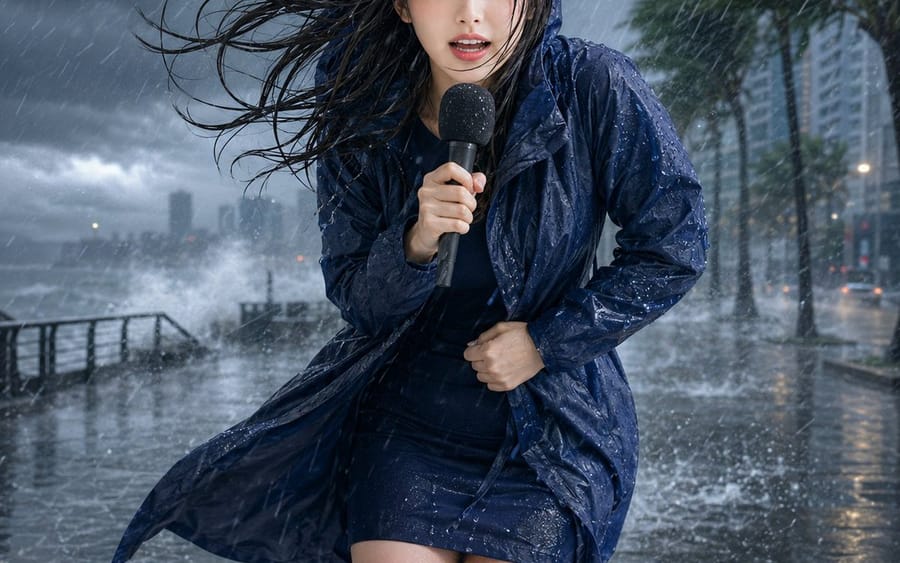
Prompt
{"title":"Extreme Weather TV Reporter System","description":"A comprehensive instruction set for GPT Image 2 to generate fictional weather reporters during extreme events like typhoons or heatwaves while maintaining character consistency from a reference image.","content":"【Input Items】 Reference image: 1, Weather type: Heatwave / Typhoon / Blizzard, Aspect ratio: Required (e.g. 1:1) 【Recommended Reference Image】 Use an image where the person's features, hairstyle, hair color, age, build, and outfit style are clear. An image showing the face to upper body or full body is recommended. A simple background is ideal. 【Main Instructions】 Depict the person in the attached reference image as an outdoor reporter reporting from a site of extreme weather in a fictional television broadcast. Faithfully maintain the features, hairstyle, hair color, eye impression, age, build, atmosphere, and expression format from the reference image, ensuring the person is recognizable. Reconstruct live-action images as high-quality realism, and anime or illustrations while maintaining the original art style, lines, coloring, and texture. Do not inherit the background, lighting, composition, or original pose from the reference image. Naturally adjust the outfit to match the input weather while keeping the original colors and atmosphere as much as possible. The person is a local reporter holding a broadcast hand microphone and reporting the situation to the camera. Depict the moment they are not just standing calmly, but are being buffeted by the extreme weather, frantically yet desperately continuing the broadcast. Make the hair, clothing, facial expression, posture, body tilt, hand movements, and belongings react naturally to the weather so the person looks like they are truly on-site. Make the facial expression large enough to convey the severity of the situation, but do not make it a serious expression of only fear or pain. Make it an impressive on-site broadcast that stands out on social media. However, this appeal should be expressed through the person's reaction and the power of the extreme weather, not through UI decorations. Overlay a simple fictional TV broadcast UI on the screen. The UI should be fixed in the same shape and placement for all weather types, with no busy decorations, weather maps, complex numbers, or long text. At the top of the screen, place small fixed UI elements paired on the left and right. On the top left, display 'LIVE' in white text inside a small red horizontal banner. On the top right, display a red and white warning triangle icon and 'ALERT' in white text as a small banner UI at the same top position, height, and design style as the top left. Align the distance of the left and right UI elements from the top and the edges, adjusting the width naturally according to the content. At the bottom of the screen, place a horizontal, simple broadcast bar. In the lower bar, display only the text exactly identical to the input weather type, largely and clearly. If input is 'Heatwave', show '猛暑'. If 'Typhoon', show '台風'. If 'Blizzard', show '猛吹雪'. Limit text only to the 'LIVE' and 'ALERT' in the top UI and the weather type display in the bottom bar. Do not display any text other than the specified weather name, such as region names, station names, program names, real logos, corporate logos, or additional tickers. Within the background, do not display readable signs, advertisements, guideboards, road sign text, descriptions, English characters, Japanese, or numbers. 【Weather-Specific Expressions】 ■ Heatwave: Use a city street corner under intense midsummer sunlight as the background. Make it immediately obvious that it is a dangerous heatwave rather than a normal sunny day. Make the road surface white-bleached, dry, matte, non-glossy asphalt. Express the dry, extreme heat with fine cracks, dry dust, strong shadows with clear outlines, and slight heat haze visible on the road in the distance. Do not include wet roads, puddles, flooding, mirror reflections, textures like after rain, splashes, fog, or steam-like appearances. The person should be sweating heavily on their forehead and neck, with a slightly flushed face, enduring the heat and glare while reporting. Hold a microphone in one hand and wipe sweat with a handkerchief or small towel in the other. Have the hair slightly messy from the heat, continuing the report while looking flustered. Express sweat primarily on the skin; do not make hair or clothes look drenched as if by rain. Keep the clothing basically dry. ■ Typhoon: Use an outdoor site with a dark sky, driving heavy rain, storm winds, splashes, wet roads, and strongly swaying trees as the background. Make the wind and rain cross the screen so the intensity of the typhoon is obvious at a glance. The person should tilt their body and plant their feet firmly while reporting. Hair is violently disheveled by the strong wind, and clothes are blown about and wet from the rain. Strongly grip the microphone with one hand and use the other hand to support the body or clothes. If necessary, naturally add simple rain gear or a hood that retains the vibe of the original outfit. Do not use an umbrella. Keep the pose dynamic but within a range where the face, hands, and microphone are easy to see as a news broadcast screen. ■ Blizzard: Use a winter street surrounded by heavy snow and strong winds as the background. Snow should be blowing horizontally, visibility should be white and hazy, and there should be thick snow accumulation on the road and surroundings. Make it clear that it is a blizzard, not just normal snowfall, where standing is difficult. The person should wear a thick winter coat, scarf, gloves, and, if necessary, a hood, crouching slightly due to the cold while leaning forward. Snow should be sticking to the hair, shoulders, and winter gear, and they should be desperately continuing the report while squinting their eyes. The color and impression of the winter gear should naturally match the outfit and atmosphere of the person in the reference image. 【Composition and Finishing】 The person should be the main focus of the screen, with a mid-range television broadcast composition clearly showing from the top of the head to above the knees. Position the person in the center of the screen, ensuring that the face, both hands, microphone, posture reacting to the weather, the background's extreme weather, upper UI, and lower UI are all clearly readable. The size of the person should fit comfortably between the upper UI and lower UI, maintaining a stable appearance for the television broadcast screen. Avoid extreme wide angles, overly poster-like compositions, or compositions where the person occupies too much of the screen. The weather should be expressed strongly and exaggeratedly, but do not completely obscure the person's face or body. Do not depict blood, injuries, collapses, evacuees, or serious disaster damage; finish it as a comical and vivid exaggerated on-site broadcast that stands out on social media. Do not overlay UI bars or text over the person, microphone, hands, or face. Accurately depict the person's body, fingers, and microphone, and do not generate overlapping persons, depersonalization, extra limbs, extra microphones, text corruption, nonsensical text, or real logos."}How to use this prompt
- 1Copy the prompt exactly, then paste it into your preferred model or Ideart project.
- 2Replace product, subject, audience, and style details with your own context.
- 3Generate one baseline result first, then remix the strongest direction into a campaign, image set, or video concept.
Explore nearby prompt paths
Model
Build from this prompt
Turn a image prompt into a finished creative project.
Save the prompt, add reference images or notes, and let Ideart shape the next production step from the same creative thread.