
ImageNano Banana Pro
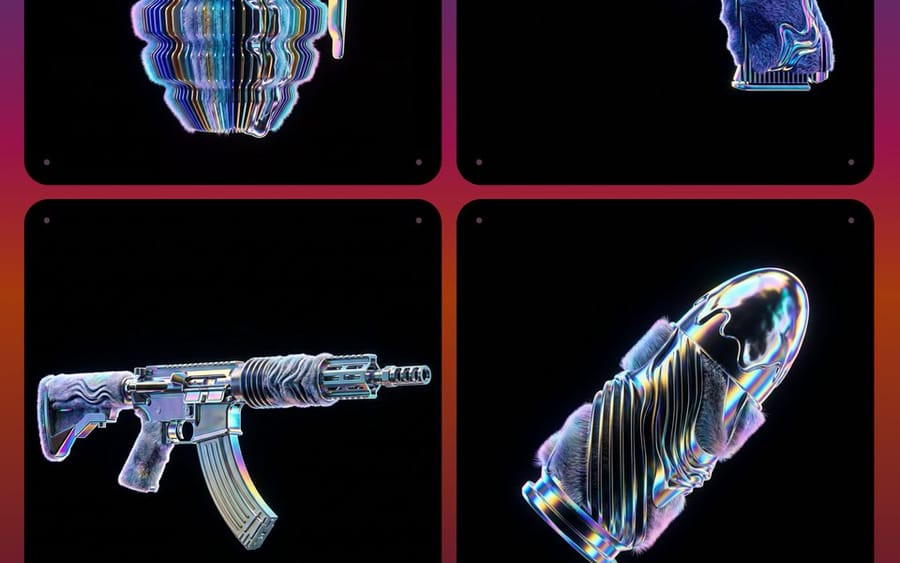
Y2K Chrome Plush Product Render
A highly technical JSON prompt for generating an 8k Octane render of a product (placeholder) stylized as a fusion of hyper-realistic plush faux fur and molten iridescent liquid chrome, with parametric 3D sliced geometry. It specifies a strictly centered, levitating subject against an absolute pitch black background, using studio-quality rim lighting and vibrant Y2K accent colors.
Prompt
{
  "image_generation_request": {
    "subject": {
      "placeholder": "{argument name="product name" default="[INSERT_PRODUCT_NAME_HERE]"}",
      "positioning": "strictly centered, floating, levitating, full view, no cropping, entire object visible within frame",
      "scale": "0.8x of frame height to ensure no edge-cut"
    },
    "stylization_blend": {
      "geometry": "parametric 3D sliced layers, vertical rhythmic ribs, undulating waveform distortions across the surface",
      "textures": [
        "hyper-realistic plush faux fur with soft tactile fibers",
        "molten iridescent liquid chrome with high-viscosity surface tension",
        "holographic dispersion and spectral color shifts on metallic edges"
      ],
      "material_properties": "fusion of soft-touch textile and hard-surface refractive glass-metal"
    },
    "environment": {
      "background": "absolute solid pitch black, hex code #000000, void",
      "lighting": "studio-quality rim lighting, internal glow, prismatic refraction, no visible light sources",
      "platforms": "none, no stands, no pedestals, no floor, no shadows on ground"
    },
    "color_palette": {
      "primary_background": "#000000",
      "accent_colors": [
        "#0000FF (Electric Blue)",
        "#FFD700 (Gold)",
        "#00FFC8 (Hyper-Cyan)",
        "#FF00FF (Vivid Magenta)"
      ],
      "shading": "high contrast, deep shadows, vibrant saturated highlights"
    },
    "negative_constraints": {
      "elements_to_exclude": [
        "text", "labels", "watermarks", "logos", "lighting boxes", "softboxes", "tripods", "camera gear",
        "platforms", "tables", "pedestals", "mannequin limbs", "props", "dust", "scratches",
        "out of frame", "cropped edges", "depth of field blur on product", "room background", "walls"
      ],
      "visual_errors": "cut off parts, clipping, extra appendages, distorted geometry beyond intended artistic ripple"
    },
    "technical_specs": {
      "rendering_style": "8k octane render, unreal engine 5.4, ray-traced reflections, photorealistic, clean minimalist aesthetic",
      "aspect_ratio": "1:1"
    }
  }
}How to use this prompt
- 1Copy the prompt exactly, then paste it into your preferred model or Ideart project.
- 2Replace product, subject, audience, and style details with your own context.
- 3Generate one baseline result first, then remix the strongest direction into a campaign, image set, or video concept.
Explore nearby prompt paths
Model
Build from this prompt
Turn a image prompt into a finished creative project.
Save the prompt, add reference images or notes, and let Ideart shape the next production step from the same creative thread.