
ImageNano Banana Pro
Y2K Frutiger Aero Glass Prismatic Tech Product Shot
A highly structured JSON prompt for generating an 8K, hyper-realistic product image combining Y2K Frutiger Aero aesthetics with modern hyper-realism. The prompt focuses on dynamic glass refraction, prismatic chromatic aberration, and iridescent lens flares, set against a dual-tone gradient background.
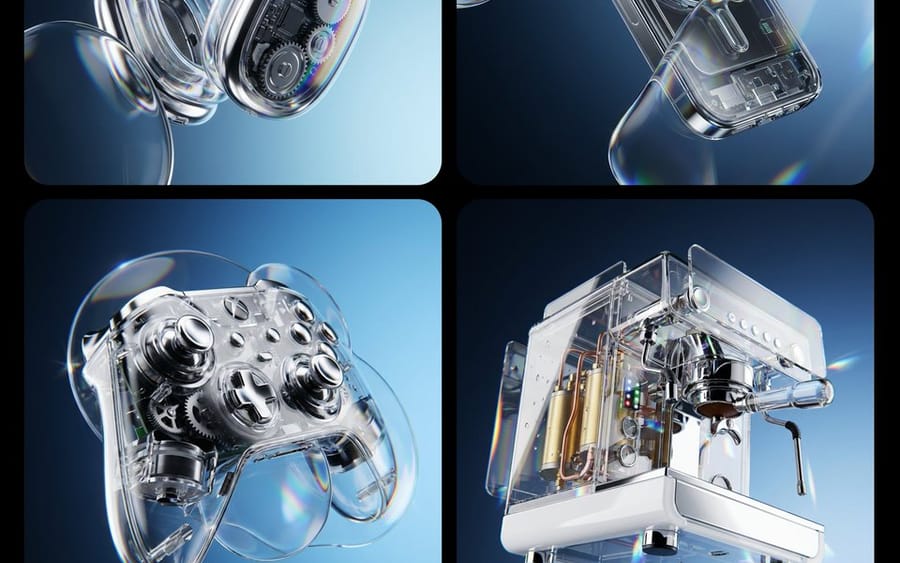
Prompt
{
  "image_generation_request": {
    "subject": "{argument name="product name" default="INSERT PRODUCT HERE"}",
    "environment": {
      "background": "A smooth, professional dual-tone gradient transition between #111B24 and #CAEFFF",
      "lighting": "High-contrast studio lighting with bright rim highlights to emphasize glossy textures"
    },
    "style_elements": {
      "aesthetic": "Y2K Frutiger Aero meets modern hyper-realism",
      "optical_effects": [
        "Dynamic glass refraction",
        "Prismatic chromatic aberration at the edges of transparent objects",
        "Iridescent lens flares",
        "Distorted glass overlays floating in the foreground"
      ],
      "composition": "Floating, gravity-defying arrangement with a wide-angle perspective",
      "textures": "Polished chrome, transparent acrylic, and high-gloss plastic"
    },
    "technical_specs": {
      "resolution": "8k UHD",
      "render_engine": "Octane Render style",
      "detailing": "Macro photography focus, hyper-detailed mechanical parts"
    }
  }
}How to use this prompt
- 1Copy the prompt exactly, then paste it into your preferred model or Ideart project.
- 2Replace product, subject, audience, and style details with your own context.
- 3Generate one baseline result first, then remix the strongest direction into a campaign, image set, or video concept.
Explore nearby prompt paths
Model
Build from this prompt
Turn a image prompt into a finished creative project.
Save the prompt, add reference images or notes, and let Ideart shape the next production step from the same creative thread.