
ImageNano Banana Pro
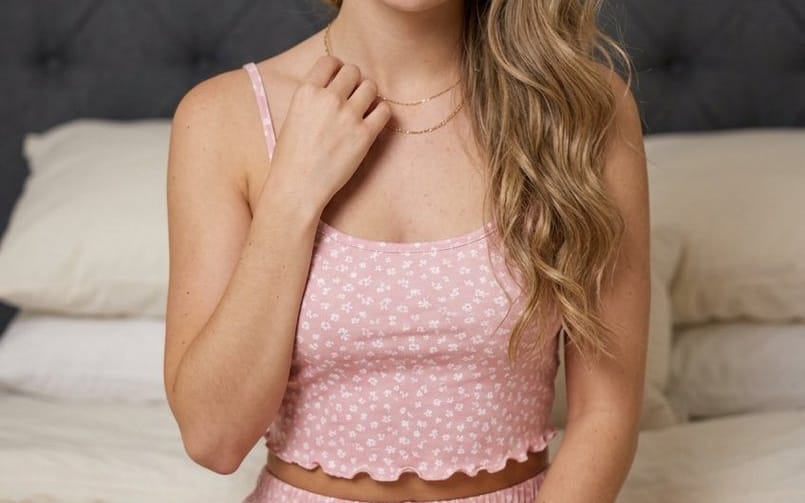
Serene Young Woman Portrait
A detailed portrait prompt for a young woman in a bedroom setting, wearing floral pajamas, designed for high-quality character consistency with specific lighting and composition parameters.
Prompt
{
  "subject": {
    "description": "{argument name="subject description" default="Young woman with a soft, direct gaze"}",
    "pose": "Sitting cross-legged on a bed, leaning forward slightly, right hand resting near the collarbone",
    "expression": "Neutral, calm, and serene"
  },
  "physical_characteristics": {
    "hair": "Long, wavy, dirty blonde hair draped over the right shoulder",
    "facial_features": {
      "eyes": "Hazel or light green with winged black eyeliner",
      "skin": "Fair complexion with prominent freckles across the nose and cheeks",
      "lips": "Full, glossy pink",
      "eyebrows": "Groomed, natural arch"
    }
  },
  "attire": {
    "outfit_type": "Two-piece pajama set",
    "color_pattern": "{argument name="outfit pattern" default="Soft pink with a small white floral print"}",
    "top_details": "Cropped camisole, thin spaghetti straps, ruffled lettuce-edge hem",
    "bottom_details": "Matching high-waisted shorts with ruffled lettuce-edge hem",
    "accessories": [
      "Delicate thin gold chain necklace",
      "White crew socks"
    ]
  },
  "environment": {
    "location": "{argument name="setting" default="Indoor bedroom"}",
    "background_elements": [
      "Dark grey tufted upholstered headboard",
      "Cream/off-white bed linens and stacked pillows"
    ],
    "lighting": "Soft, diffused indoor lighting creating gentle shadows",
    "color_palette": [
      "Pastel pink",
      "Cream",
      "Slate grey",
      "Natural skin tones"
    ]
  },
  "image_composition": {
    "shot_type": "Medium shot",
    "orientation": "Vertical/Portrait",
    "focus": "Sharp focus on the subject with a shallow depth of field in the background"
  }
}How to use this prompt
- 1Copy the prompt exactly, then paste it into your preferred model or Ideart project.
- 2Replace product, subject, audience, and style details with your own context.
- 3Generate one baseline result first, then remix the strongest direction into a campaign, image set, or video concept.
Explore nearby prompt paths
Model
Build from this prompt
Turn a image prompt into a finished creative project.
Save the prompt, add reference images or notes, and let Ideart shape the next production step from the same creative thread.