
ImageGPT Image 2
Viral YouTube Thumbnail Template
A comprehensive structure for generating high-click-through-rate YouTube thumbnails with customized subjects, expressions, and lighting.
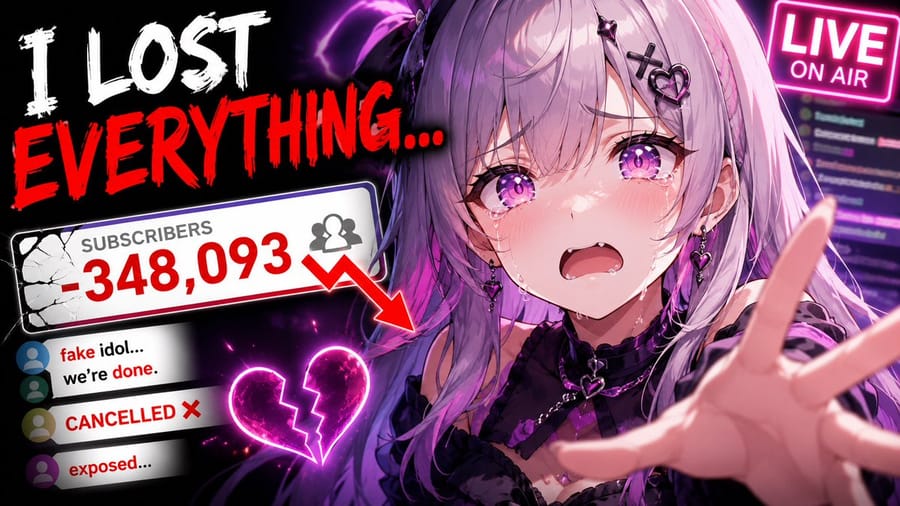
Prompt
Create a highly clickable YouTube thumbnail. SUBJECT: {argument name="subject" default="main character/object/person"} EXPRESSION / ACTION: [strong emotion, reaction, movement, pose] COMPOSITION: [close-up / medium shot / wide shot] [subject placement] [camera angle] [foreground/background separation] VISUAL HIERARCHY: primary focus should immediately draw attention to [important subject] secondary details should support the story without clutter LIGHTING: {argument name="lighting" default="cinematic lighting style"} [rim light / glow / dramatic contrast / soft light] COLOR DISTRIBUTION: dominant colors: [ ] accent colors: [ ] high contrast between subject and background BACKGROUND: [simple readable environment] avoid clutter support the narrative only STYLE: [realistic / anime / cinematic / watercolor / stylized / etc.] THUMBNAIL OPTIMIZATION: ultra readable at small size high contrast silhouette large facial expression clean negative space minimal objects strong emotional clarity high saturation focal points professional YouTube thumbnail composition ASPECT RATIO: {argument name="aspect ratio" default="16:9"}How to use this prompt
- 1Copy the prompt exactly, then paste it into your preferred model or Ideart project.
- 2Replace product, subject, audience, and style details with your own context.
- 3Generate one baseline result first, then remix the strongest direction into a campaign, image set, or video concept.
Explore nearby prompt paths
Model
Build from this prompt
Turn a image prompt into a finished creative project.
Save the prompt, add reference images or notes, and let Ideart shape the next production step from the same creative thread.