
ImageNano Banana Pro
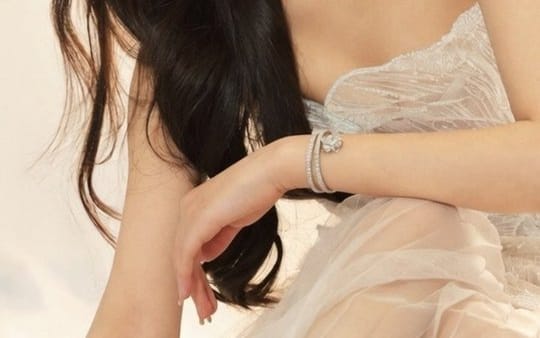
Zhao Lusi — Ethereal Mermaid Goddess Editorial Portrait
An extremely detailed, structured JSON prompt for generating an ethereal, high-fashion editorial portrait of actress Zhao Lusi as a 'Mermaid Goddess,' emphasizing a strapless white couture gown, golden hour lighting, and a coastal beach setting with soft bokeh effects.
Prompt
{
  "prompt_title": "Zhao Lusi — Ethereal Mermaid Goddess Editorial Portrait",

  "subject": {
    "name": "Zhao Lusi",
    "known_as": "Rosy Zhao",
    "profession": ["Actress", "Singer"],
    "position": "Centered in frame, seated gracefully",
    "expression": "Calm, poised, soft neutral gaze, looking directly into camera",
    "pose": "Elegant seated posture, relaxed shoulders, natural hand placement"
  },

  "appearance": {
    "hair": {
      "color": "Dark brown",
      "style": "Long, voluminous soft waves draped over shoulder",
      "details": "Delicate bangs, butterfly-shaped hair accessory"
    },
    "makeup": {
      "style": "Dewy, natural editorial makeup",
      "skin": "Smooth, luminous, glowing skin",
      "eyes": "Soft shimmering eyeshadow",
      "lips": "Soft coral-pink lip color",
      "overall": "Fresh, ethereal, goddess-like aesthetic"
    }
  },

  "wardrobe": {
    "dress": {
      "type": "Strapless white couture gown",
      "bodice": "Intricate wave-like pleating, shimmering textures",
      "skirt": "Layered sheer tulle, voluminous, sea-foam inspired spread",
      "style": "High fashion, editorial couture"
    },
    "jewelry": {
      "bracelet": "Delicate diamond bracelet",
      "earrings": "Small floral-shaped diamond stud earrings"
    }
  },

  "environment": {
    "location": "Coastal beach setting",
    "background": "Water reflecting sunlight",
    "atmosphere": "Dreamy, celestial, oceanic, mermaid goddess aesthetic"
  },

  "lighting": {
    "type": "Golden hour natural lighting",
    "direction": "Backlit with soft halo effect around hair and body",
    "quality": "Soft, warm, cinematic glow",
    "effect": "Romantic, ethereal, luxury editorial lighting"
  },

  "camera": {
    "camera_model": "Sony A7R IV",
    "lens": "85mm portrait lens",
    "aperture": "f/1.8",
    "depth_of_field": "Shallow depth of field",
    "focus": "Subject sharp, background blurred"
  },

  "visual_effects": {
    "bokeh": "Soft circular golden bokeh from sunlight reflecting on water",
    "texture": "Hyper-detailed fabric rendering, realistic skin texture",
    "resolution": "8K ultra-high resolution",
    "quality": "Photorealistic, magazine cover quality"
  },

  "color_palette": {
    "primary_colors": ["Warm gold", "Cream white", "Soft ivory"],
    "tones": "Warm, romantic, elegant",
    "style": "Luxury editorial fashion palette"
  },

  "style": {
    "genre": "Editorial fashion photography",
    "aesthetic": ["Dreamy mermaid", "Celestial goddess", "Luxury couture"],
    "inspiration": ["Vogue editorial", "High-fashion magazine cover"],
    "rendering": "Ultra-realistic, cinematic, professional photography"
  },

  "technical_specifications": {
    "aspect_ratio": "4:5 portrait",
    "resolution": "8K UHD",
    "render_quality": "Hyper-detailed, photorealistic",
    "dynamic_range": "High dynamic range (HDR)"
  }
}How to use this prompt
- 1Copy the prompt exactly, then paste it into your preferred model or Ideart project.
- 2Replace product, subject, audience, and style details with your own context.
- 3Generate one baseline result first, then remix the strongest direction into a campaign, image set, or video concept.
Explore nearby prompt paths
Model
Categories
Build from this prompt
Turn a image prompt into a finished creative project.
Save the prompt, add reference images or notes, and let Ideart shape the next production step from the same creative thread.