
ImageNano Banana Pro
Zootropolis Couple Mirror Selfie Prompt
A detailed JSON prompt for generating an ultra-realistic, hyper-detailed mirror selfie of a couple in a Disney store, wearing luxury oversized Zootropolis character hats (Nick Wilde and Judy Hopps), emphasizing K-beauty makeup, specific accessories, and sharp focus.
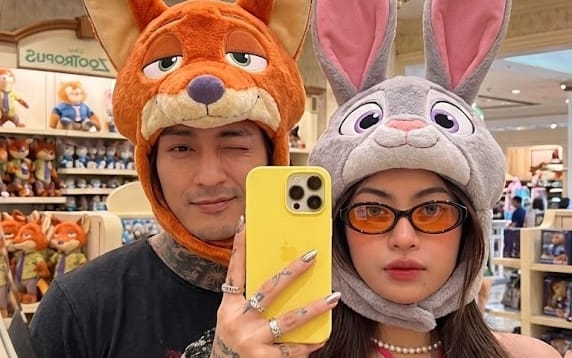
Prompt
{
  "prompt": {
    "scene": {
      "type": "ultra-realistic mirror selfie",
      "device": "iPhone 15 Pro Max",
      "resolution": "8K",
      "style": "photorealistic, hyper-detailed",
      "aesthetic": "Zootropolis fandom",
      "composition": "couple selfie reflected in an oval mirror"
    },
    "subjects": {
      "left_subject": {
        "type": "young man",
        "identity": "use facial features from Photo 1",
        "expression": "playful, mischievous (match reference expression)",
        "pose": "standing on the left side of the mirror",
        "clothing_hair": "same outfit and hairstyle as Photo 1",
        "accessories": {
          "hat": {
            "character": "Nick Wilde (Zootropolis)",
            "color": "orange",
            "details": "luxury oversized Disney character hat with large fox ears and embroidered sly eyes"
          }
        }
      },
      "right_subject": {
        "type": "young woman",
        "identity": "use facial features from Photo 2",
        "expression": "playful wink",
        "pose": "standing on the right side of the mirror, holding a bright yellow phone",
        "nails": "metallic nail polish",
        "hair": {
          "style": "long, straight hair"
        },
        "clothing": {
          "top": "{argument name="woman's top color" default="hot pink"} halter top"
        },
        "accessories": {
          "hat": {
            "character": "Judy Hopps (Zootropolis)",
            "color": "gray",
            "details": "luxury oversized Disney character hat with long pink bunny ears and big purple eyes"
          },
          "necklace": "short pearl necklace fitted around the neck",
          "rings": "multiple rings on fingers"
        },
        "makeup": {
          "style": "Korean K-beauty",
          "skin": "glass skin",
          "blush": "soft natural blush",
          "eyeliner": "black eyeliner",
          "contact_lenses": "colored lenses (blue or gray)",
          "lips": "pink ombre lipstick with reddish tones"
        }
      }
    },
    "environment": {
      "location": "Disney toy / souvenir store interior",
      "background": {
        "details": "blurred shelves filled with Disney toys",
        "lighting": "holiday mall lighting",
        "ceiling": "decorative hanging lights"
      }
    },
    "lighting": {
      "type": "soft commercial mall lighting",
      "effect": "even illumination, vibrant colors, no harsh shadows"
    },
    "quality": {
      "detail_level": "extremely high",
      "textures": "luxury realistic textures, visible individual fur fibers on hats",
      "color": "bright saturated colors",
      "noise": "none",
      "focus": "perfect sharp focus on faces and hats"
    },
    "framing": {
      "shot_type": "mirror selfie",
      "mirror": "oval mirror",
      "focus_priority": "faces and character hats centered in frame"
    }
  }
}How to use this prompt
- 1Copy the prompt exactly, then paste it into your preferred model or Ideart project.
- 2Replace product, subject, audience, and style details with your own context.
- 3Generate one baseline result first, then remix the strongest direction into a campaign, image set, or video concept.
Explore nearby prompt paths
Model
Build from this prompt
Turn a image prompt into a finished creative project.
Save the prompt, add reference images or notes, and let Ideart shape the next production step from the same creative thread.