
VideoSeedance 2.0
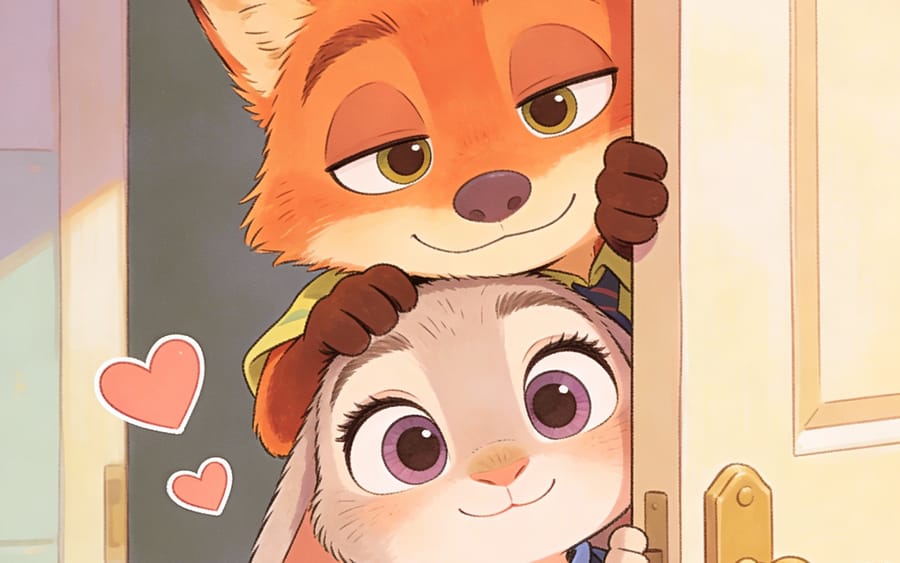
Nick and Judy Chibi Hand-Drawn Illustration
This cute chibi hand-drawn illustration prompt depicts Nick and Judy peeking out from behind a door, ideal for stickers, avatars, or childlike illustration designs.
Prompt
{"title":"Nick and Judy Chibi Hand-Drawn Illustration","description":"This cute chibi hand-drawn illustration prompt depicts Nick and Judy peeking out from behind a door, ideal for stickers, avatars, or childlike illustration designs.","content":"16:9 landscape, Chinese animation style, silver-white cold color tone. 0 - 3 seconds: Late night restaurant rooftop, a black-clad assassin with a crossbow quiver on his back, long face with deep-set eyes, thin lips pressed tight, shadowy figure under the moonlight, each hand holding three shurikens, camera zooms from a close-up of the shuriken to a full-body shot. 4 - 8 seconds: Opposite, a gray-clad hero holding flying knives, oval face with starry eyes, a faint scar between the eyebrows, long hair tied back with a gray cloth into a low ponytail, holding a knife as thin as a cicada's wing between his fingers, camera circles around to capture the standoff between the two. 9 - 12 seconds: Both strike simultaneously, six shurikens and ten flying knives intertwine and collide in the air, producing a continuous metallic clashing sound, sparks burst like silver fireworks, some hidden weapons graze the rooftop tiles leaving marks, slow-motion follows a flying knife that shatters a shuriken and continues its flight path. 13 - 15 seconds: After exhausting their hidden weapons, they engage in close combat, daggers and short knives clash rapidly on the rooftop, finally, the gray-clad hero kicks the assassin's dagger away while holding a flying knife to the opponent's throat, moonlight shines on their faces as the assassin slowly raises his hands in surrender. Sound effects: whistling of hidden weapons, metal clashes, tiles shattering, fabric fluttering. Prohibited: any text, subtitles, logos, or watermarks."}How to use this prompt
- 1Copy the prompt exactly, then paste it into your preferred model or Ideart project.
- 2Replace product, subject, audience, and style details with your own context.
- 3Generate one baseline result first, then remix the strongest direction into a campaign, image set, or video concept.
Build from this prompt
Turn a video prompt into a finished creative project.
Save the prompt, add reference images or notes, and let Ideart shape the next production step from the same creative thread.