
VideoSeedance 2.0
Pulp Comic Style Poster Design with Multiple Characters Prompt
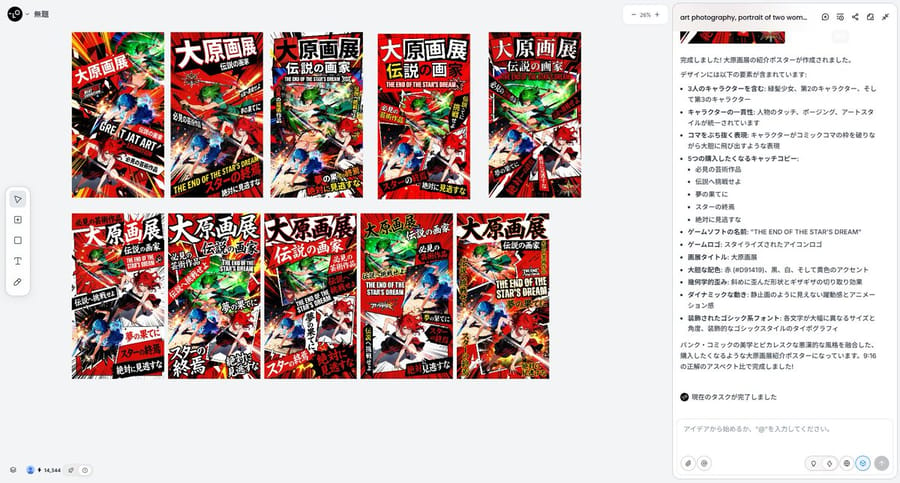
A prompt for Nano Banana Pro (via Lovart) to create a dynamic, high-impact poster design in a 'pulp' or 'picaresque' comic style, featuring three specific characters from reference images. It specifies a bold color palette (red, black, white, yellow), geometric distortion, dynamic movement, and highly stylized typography with varying size and angle for Japanese text.
Prompt
{"title":"Pulp Comic Style Poster Design with Multiple Characters Prompt","description":"A prompt for Nano Banana Pro (via Lovart) to create a dynamic, high-impact poster design in a 'pulp' or 'picaresque' comic style, featuring three specific characters from reference images. It specifies a bold color palette (red, black, white, yellow), geometric distortion, dynamic movement, and highly stylized typography with varying size and angle for Japanese text.","content":"Scene (0-5 seconds): Close-up of the female lead tearing the contract, paper scraps falling, the CEO kneeling on one knee reaching out to stop her, a panicked look in his eyes, the female lead sidestepping, a cold smile at the corner of her mouth.\nLine 1 (CEO, humble and panicked): Su Wan! The contract isn't over, you can't leave! I'll give you money, I'll give you status!\nScene (6-10 seconds): The female lead lifts her foot to avoid his hand, throwing the torn contract paper in his face, the camera sweeps over the surrounding guests whispering.\nLine 2 (female lead, cold counterattack): Contract? Mr. Gu, you said back then that I wasn't even worthy to carry your shoes, now you're begging me? Too late!\nScene (11-15 seconds): The CEO is frozen in place, paper scraps on his face, the female lead turns and leaves with her head held high, the hem of her red dress fluttering.\nSound effects: A glamorous yet tense background sound, the sound of the contract tearing, and the faint whispers of the guests.\nDuration: Exactly 15 seconds"}How to use this prompt
- 1Copy the prompt exactly, then paste it into your preferred model or Ideart project.
- 2Replace product, subject, audience, and style details with your own context.
- 3Generate one baseline result first, then remix the strongest direction into a campaign, image set, or video concept.
Build from this prompt
Turn a video prompt into a finished creative project.
Save the prompt, add reference images or notes, and let Ideart shape the next production step from the same creative thread.