
VideoSeedance 2.0
Whimsical Isometric Product Architecture Illustration
A prompt for generating a whimsical 2D flat illustration in an isometric micro-world style, where a single product (like a Coca-Cola can) is transformed into a bustling miniature building with architectural details and tiny characters interacting with it.
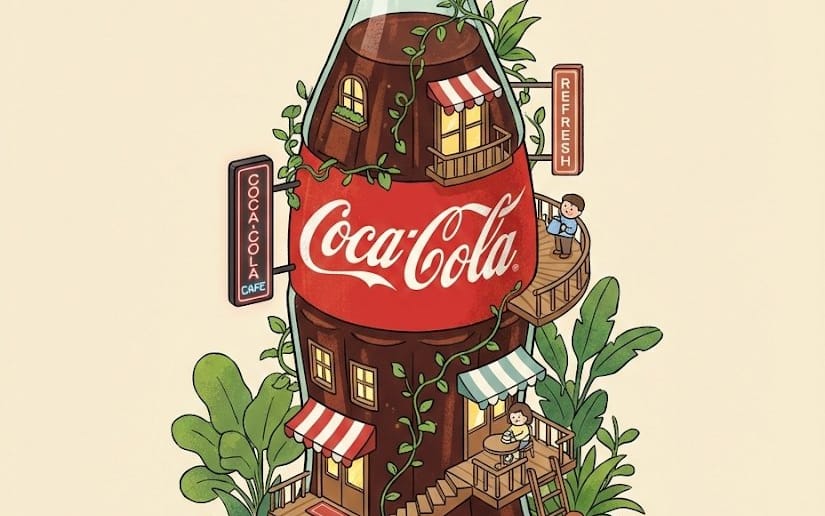
Prompt
Seedance 2.0 Video Generation Prompt

This video is a smooth, high-fidelity, Toku-style (special effects style) sci-fi action scene, centered on seamlessly transforming the subject in the @image into full-body power armor, accompanied by smooth energy effects and scene interaction.

[Scene Description - Gritty Urban Battlefield]

Environment: An abandoned concrete outdoor stadium under gloomy, cloudy weather. The ground is full of cracks, gravel, and old white markings. The background features dilapidated, rusty goal frames and high wire fences. There are a few sparse trees and utility towers in the distance.

Atmosphere: Tense, desolate, collision of sci-fi and reality.
Initial Character: Young Asian female (based on input image), long hair, wearing a beige hoodie and white short skirt. Several young males are playing basketball or loitering in the background.
[Action Choreography - Transformation Sequence]

Conflict Escalation:
In the distance, a massive, black metal and rock-textured monster (similar to Kaiju, with spikes, purple glowing eyes) suddenly rises from cracks in the ground, kicking up huge amounts of dust.
The crowd panics and scatters.

Core Transformation Process (Fluid Transformation - Key Smoothness Description):
The woman notices the monster, looks at it, raises her right hand, revealing a miniature purple glowing device on her wrist.
(Fluid transformation begins): Purple and pink energy ripples start from the device, growing and flowing over her body like liquid metal and energy streams.
The beige hoodie and short skirt are smoothly and organically covered and absorbed by a complex, black and dark gold full-body power armor. Armor blocks grow and lock onto her limbs, torso, and legs.
A complex belt with a purple core locks around her waist. The armor surface has fine textures and glowing purple/pink energy conduits.
VFX: Flying blades (crystal-like, glowing purple) levitate from her side as the transformation completes and flow around her smoothly.
[Action & Decisive Battle]
Battle Actions:
The monster roars and charges at her.
The armored woman raises her arms, and purple energy blades are launched from her side, forming a smooth flying formation attacking the monster.
At the same time, she releases a powerful, pulsing violet energy wave.

Impact Effects:
The flying blades and energy wave hit the monster smoothly, creating a massive, dazzling purple explosion effect and a lot of dust.
The monster is knocked back, and the ground cracks deepen.
[Resolution & Aftermath]
Ending: The monster is defeated, disappearing or exploding (creating final dust).
Final Shot: The armored woman stands in the center of the stadium as dust slowly settles. The flying blades return to their trajectory. She smoothly looks back (similar to input image), then turns and walks towards the abandoned goal, her armor glinting in the gloomy light, leaving heavy footprints.
[Technical Details]
Camera: Dynamic close-ups and mid-shots. Use smooth tracking shots to capture the fluidity during the transformation, and dynamic, quick shots (Shaky cam/snap zoom) during the battle.

Color: Gloomy gray scene, contrasting vivid, pulsing purple and pink energy colors.

Textures: High-fidelity armor textures, rock-textured monster, gritty concrete ground.
Key Smoothness Instructions: The transformation must be a smooth, uninterrupted flow, not a segmented montage. Energy effects (transformation, flying blades, attacks) must flow and change colors smoothly and logically.
How to use this prompt
- 1Copy the prompt exactly, then paste it into your preferred model or Ideart project.
- 2Replace product, subject, audience, and style details with your own context.
- 3Generate one baseline result first, then remix the strongest direction into a campaign, image set, or video concept.
Build from this prompt
Turn a video prompt into a finished creative project.
Save the prompt, add reference images or notes, and let Ideart shape the next production step from the same creative thread.