
VideoSeedance 2.0
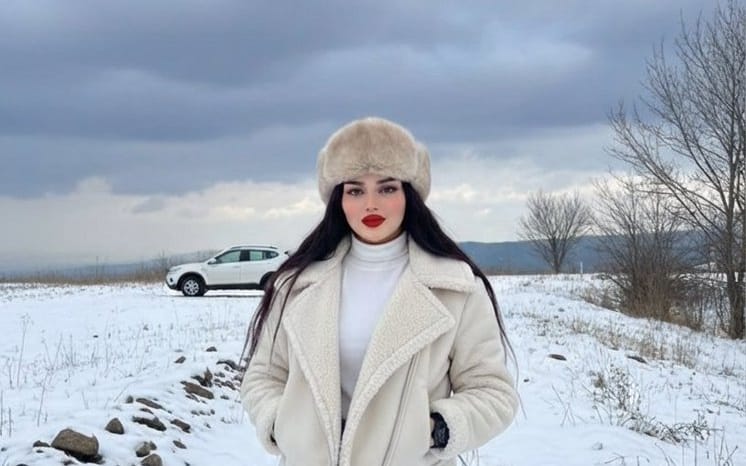
Winter Fashion Editorial in Snowy Field
A structured JSON prompt for generating a photorealistic fashion editorial image set in a vast, snowy field during winter. It details the subject's appearance, including a {argument name="hat type" default="fluffy beige fur ushanka"} and a cream-colored shearling aviator jacket, under dramatic overcast lighting.
Prompt
{"title":"Winter Fashion Editorial in Snowy Field","description":"A structured JSON prompt for generating a photorealistic fashion editorial image set in a vast, snowy field during winter. It details the subject's appearance, including a {argument name=\"hat type\" default=\"fluffy beige fur ushanka\"} and a cream-colored shearling aviator jacket, under dramatic overcast lighting.","content":"core_style: 80s-90s Shaw Brothers film style, early Hong Kong Wuxia drama aesthetics, nostalgic Chinese Wuxia movies, vintage TV quality, warm tones with high saturation palette, retro film grain texture, slight Technicolor chromatic aberration, classic studio backdrop feel, soft stage lighting. visual_quality: 35mm film photography, physical film defects, vintage film texture, subtle chromatic dispersion, soft focus effect, slight light flicker, strong bloom on highlight surfaces. character_modeling: female_character - classic 80s period drama makeup, black eyeliner, peach-pink lip balm, exquisite braids with pink ribbons and flower accessories, traditional light blue and white Hanfu with floral embroidery and silk texture. male_character - classic Wuxia young scholar appearance, long hair tied with a white ribbon at the waist, signature sideburns, clean-shaven face, pure white scholar/knight robe. script_and_storyboard: logic - sitcom editing logic with early physical transition effects. scenes: shot_1, [Close-up, a young woman looks affectionately at a black and white cow cat on a wooden table. Dialogue: 'If only you could turn into a handsome guy.'] shot_2, [Medium shot, the cow cat is licking its paws, then a burst of retro white physical smoke effect erupts in the center of the screen.] shot_3, [Transformation, smoke clears, a handsome man in white robes appears where the cat was.] shot_4, [Over-the-shoulder shot, the woman looks surprised and happy, reaching out to touch the man's shoulder or chest. Dialogue: 'Wow, you really became a handsome guy!'] shot_5, [Medium shot, the man has a serious expression, gesturing with orchid fingers and speaking in a charming tone. Dialogue: 'Did you forget you already neutered me? I've changed now, I'm your sister!'] shot_6, [Close-up, the woman is stunned in place, expression shocked. Dialogue: 'Ah!?'] audio_and_post_production: 'Puff' transformation sound effect, nostalgic Hong Kong background music, AI voiceover with 'old movie' or 'TVB dubbing style' accent, duration 00:30."}How to use this prompt
- 1Copy the prompt exactly, then paste it into your preferred model or Ideart project.
- 2Replace product, subject, audience, and style details with your own context.
- 3Generate one baseline result first, then remix the strongest direction into a campaign, image set, or video concept.
Explore nearby prompt paths
Model
Build from this prompt
Turn a video prompt into a finished creative project.
Save the prompt, add reference images or notes, and let Ideart shape the next production step from the same creative thread.