
VideoGrok Imagine
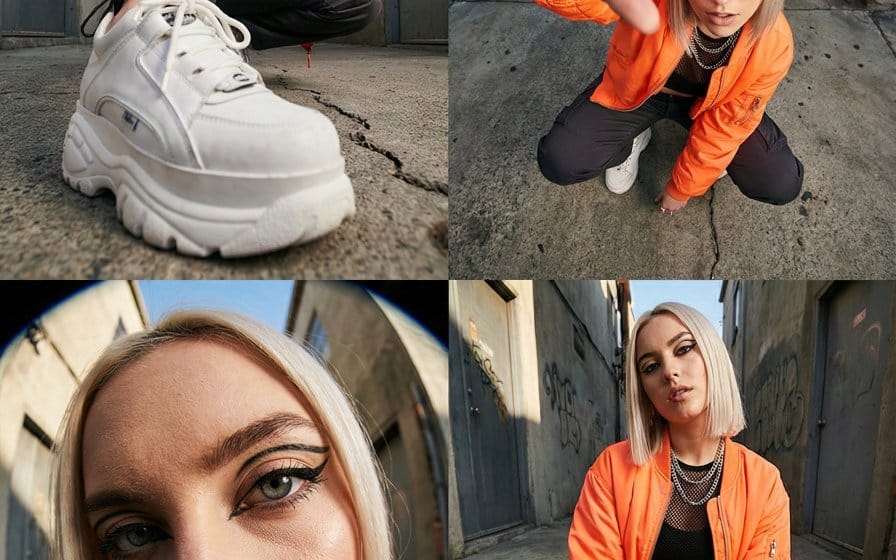
High-Fashion Streetwear Editorial with Forced Perspective
A highly technical and structured JSON prompt for generating a multi-panel, high-fashion streetwear editorial image. It focuses on technical execution, including multi-panel consistency, identity locking (strict enforcement of facial features from a reference), extreme wide-angle perspective study, and detailed descriptions of the model's appearance, wardrobe (neon orange bomber, tactical pants), and material fidelity.
Prompt
{"title":"High-Fashion Streetwear Editorial with Forced Perspective","description":"A highly technical and structured JSON prompt for generating a multi-panel, high-fashion streetwear editorial image. It focuses on technical execution, including multi-panel consistency, identity locking (strict enforcement of facial features from a reference), extreme wide-angle perspective study, and detailed descriptions of the model's appearance, wardrobe (neon orange bomber, tactical pants), and material fidelity.","content":"▼Video 1↖︎: Describe character details referencing 7 images\n\nPrompt: Character detail description (approximately 1000 characters in YAML)\n\n・A single scene interpreted comprehensively from 7 images without any cut transitions\n\n―――――\n▼Video 2↗︎: Referencing 7 images without a prompt\n\nPrompt: "." (It seems that a completely no-prompt scenario is not possible with more than 2 images)\n\n・Not much different from 1\n\n―――――\n▼Video 3↙︎: Referencing 7 images with cut transitions instructed by each image reference\n\nPrompt: "Switch cuts in the order of @ image1→ @ image2→ (omitted) → @ image7"\n\n・Cut transitions are functioning\n・Not all are used (5 cuts barely fit in 6 seconds)\n・It feels like they are redrawn in similar compositions rather than using the reference images directly\n\n―――――\n▼Video 4↘︎: Scene transition referencing character sheet, starting frame image, and background image\n\nPrompt: "The character from @ image1 dozes off and wanders into the world of @ image3 like @ image2. Dreamy transition. Dynamic camera work""}How to use this prompt
- 1Copy the prompt exactly, then paste it into your preferred model or Ideart project.
- 2Replace product, subject, audience, and style details with your own context.
- 3Generate one baseline result first, then remix the strongest direction into a campaign, image set, or video concept.
Build from this prompt
Turn a video prompt into a finished creative project.
Save the prompt, add reference images or notes, and let Ideart shape the next production step from the same creative thread.